YumYum App
Simple, Healthy and varied recipes for your baby!
A Project With Personal Meaning
User Research
The following screens showcase the survey I conducted with parents of infants, mapping their pain points, desires, and needs when using the recipe app. The key insights from this research informed the app’s feature specification, design, and overall user experience.
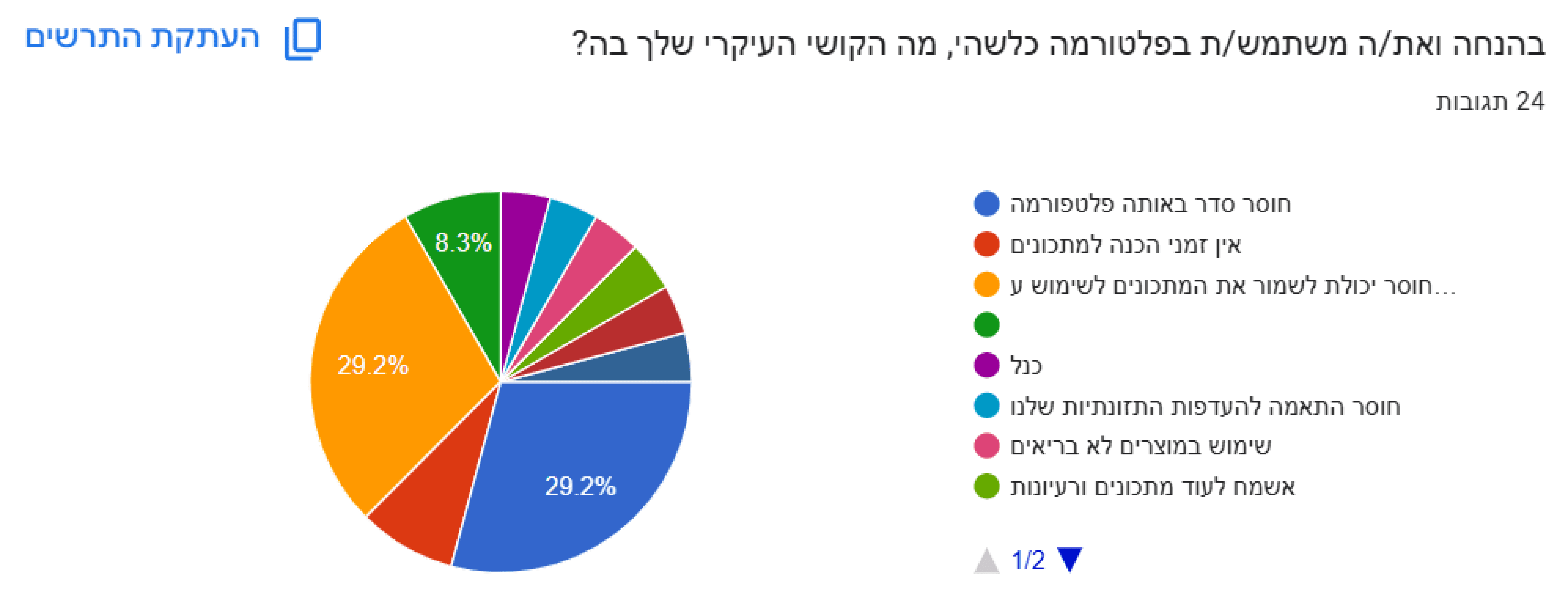
Problem
Shows parents' need for an organized recipe platform with a save option
Solution
I designed an organized recipe library with clear categories and the option to save recipes, so parents can easily revisit their favorite recipes at any time
Problem
The data highlights parents' need for simple and quick recipes
Solution
I incorporated a filter option by preparation time in the app, allowing parents to easily find simple and quick recipes that fit into their busy daily routine.
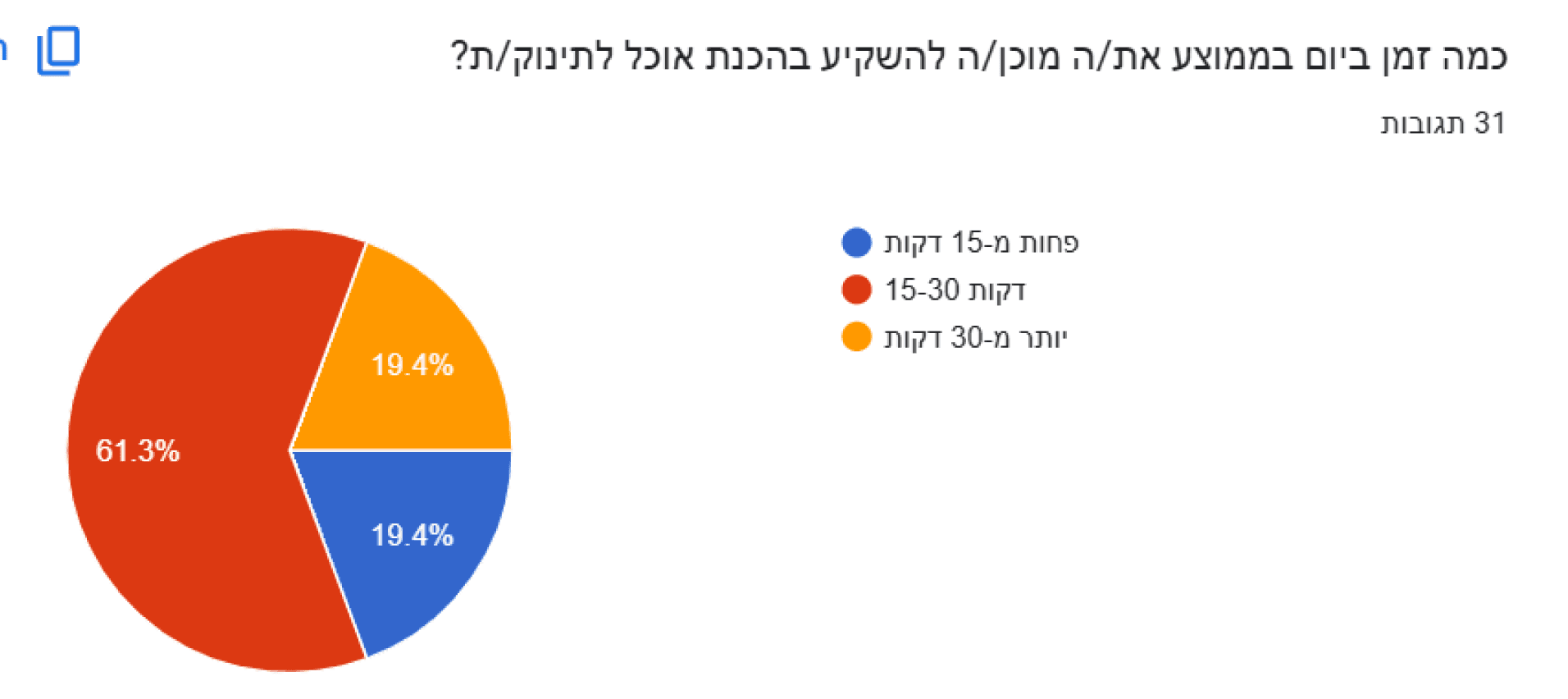
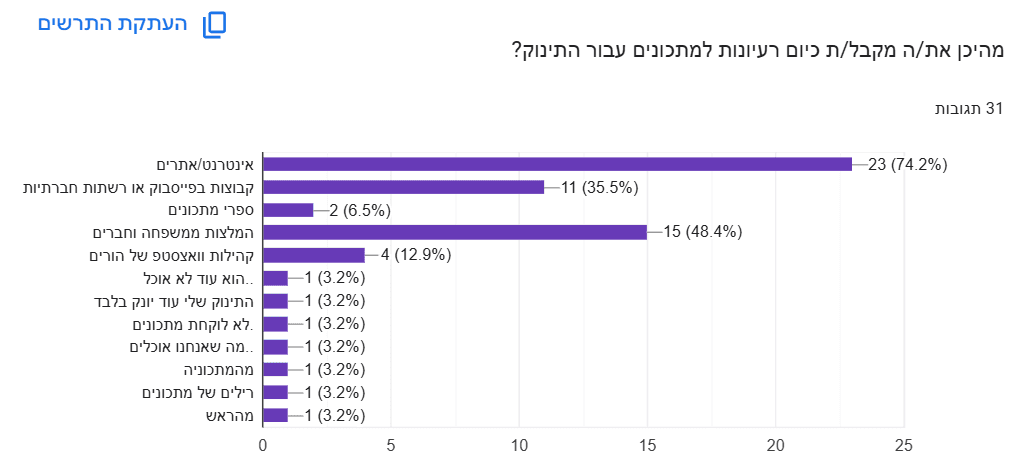
Problem
Reinforces the need for an accessible platform with baby recipes in one place
Solution
I designed a centralized and user-friendly platform that includes all the recipes in one place – with clear navigation and filters by age and developmental stage, to provide an efficient and pleasant user experience for parents.
Problem
Emphasizes the importance of combining short preparation time with high nutritional value for parents
Solution
I created a recipe display that includes preparation time and nutritional information, so parents can choose recipes that are both quick to prepare and provide high nutritional value for their baby.
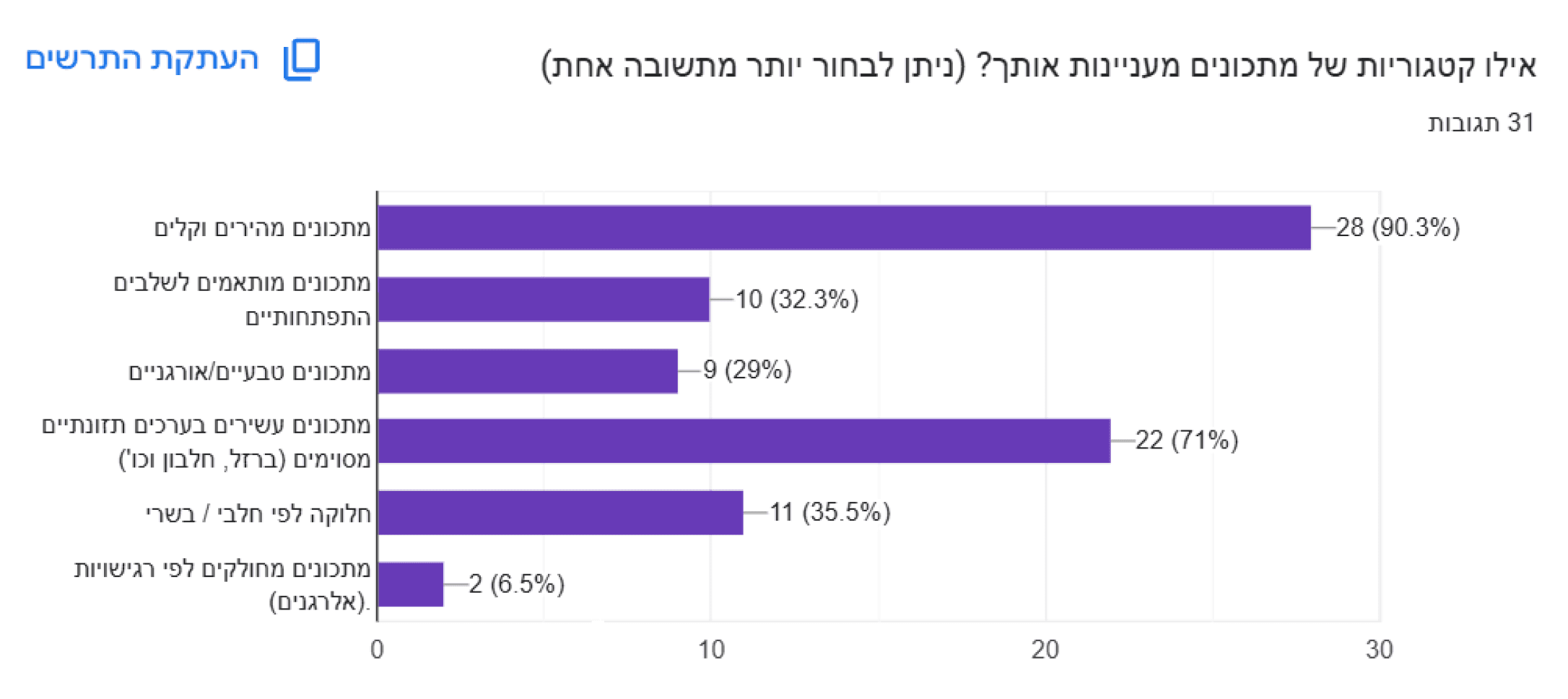
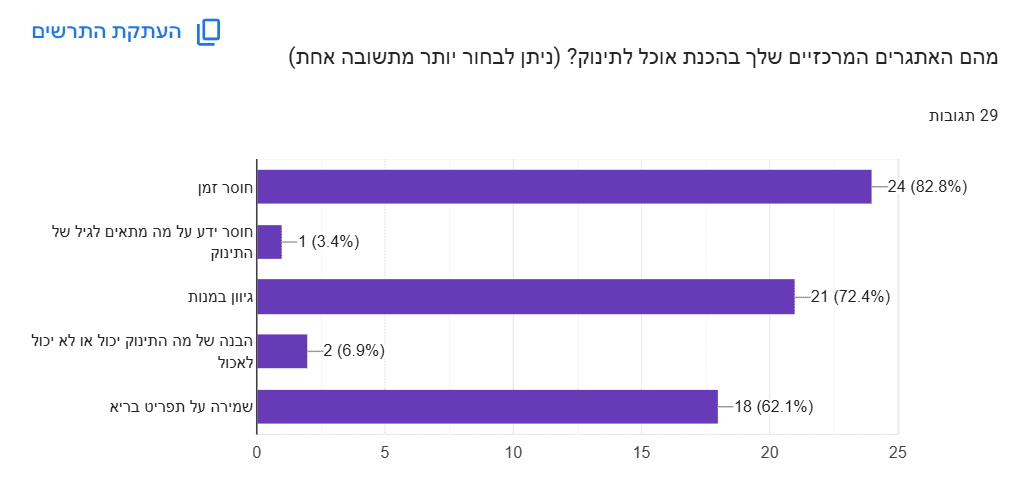
Problem
Indicates the need for quick, nutritious, healthy, and diverse recipes for babies
Solution
I developed an interface that displays a wide variety of baby recipes, with the option to filter by health, nutritional ingredients, preparation time, and dish types – to ensure variety, nutritional value, and quick preparation availability.
Problem
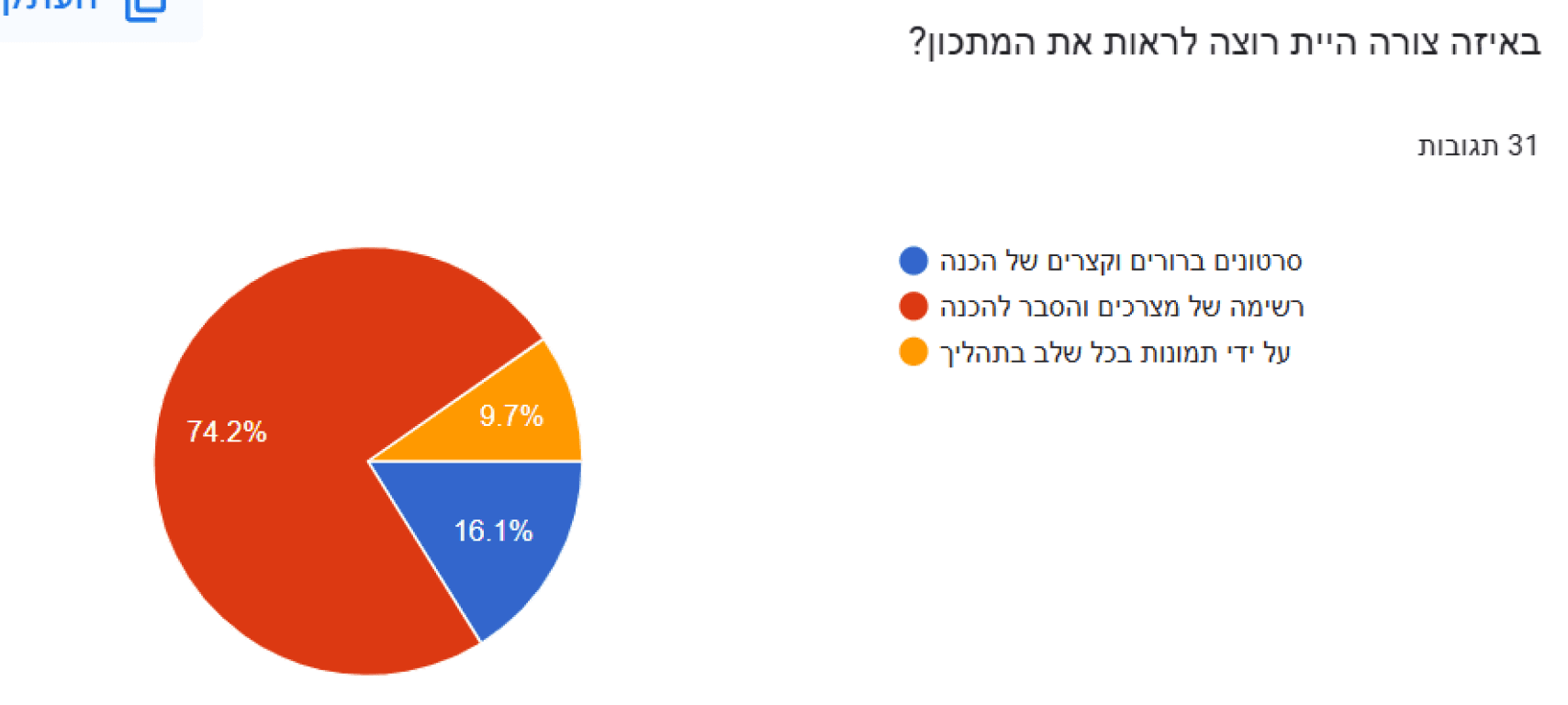
Demonstrates the most convenient way for parents to view recipes
Solution
I designed a clear recipe display with a title, suitable age, ingredient list, and simple instructions, so parents can quickly determine if the recipe is right for them – even while cooking.
Problem
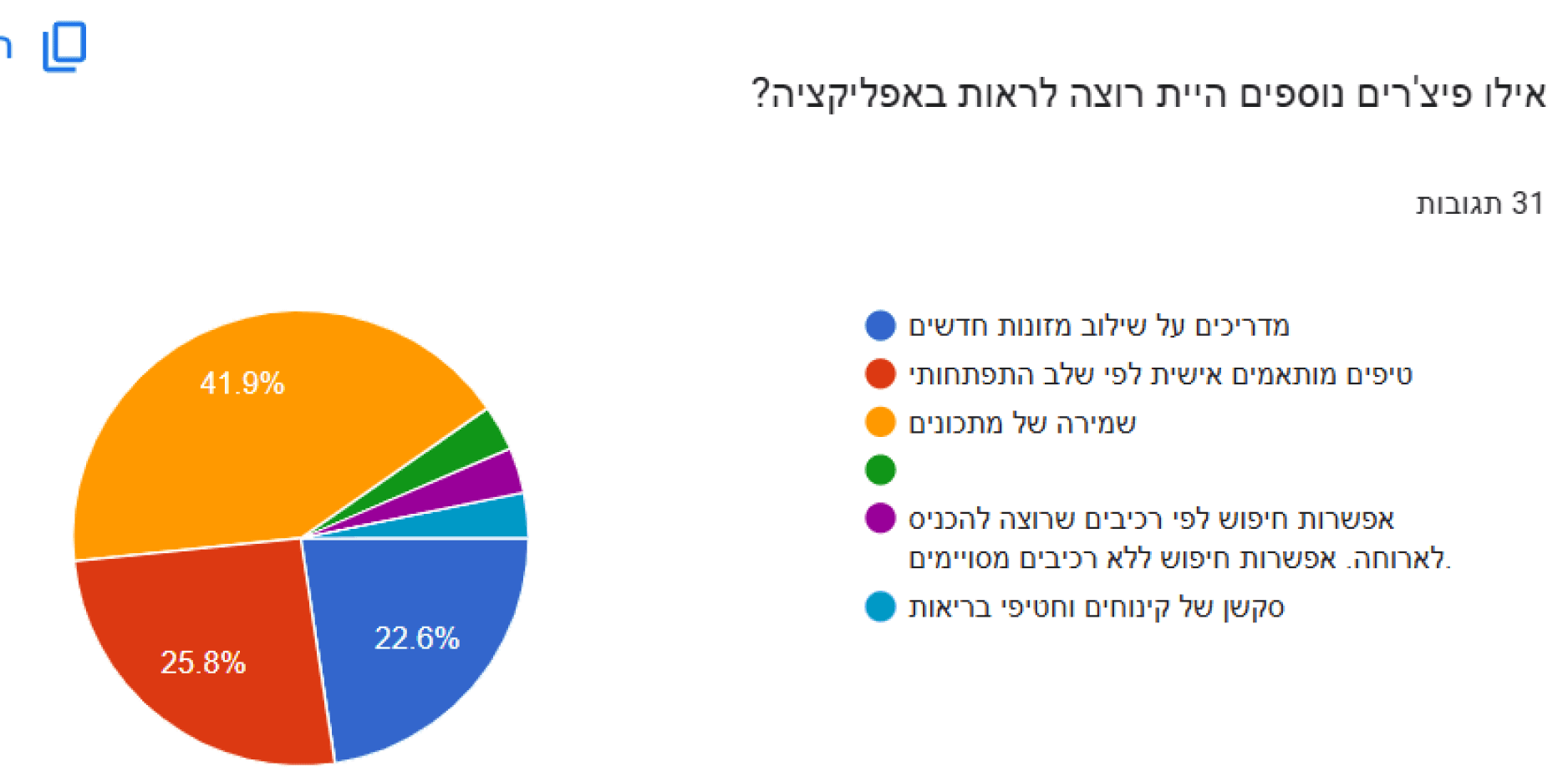
Once again, highlights parents' need to save recipes for future use.
Solution
I added an option to save recipes as favorites, presented in an appealing way with a pleasant animation, along with the ability to add personal notes, allowing parents to collect favorite recipes, make changes, and easily return to them.
From Needs Specification to User Experience Design
Although this was an educational project, I wanted to gain a real understanding of the field, so I conducted research with young parents to identify their challenges in finding healthy, age-appropriate recipes. Based on the insights gathered, I created a specification document detailing their pain points, needs, and design ideas, which ultimately guided the development of the app.
Pain Points
Difficulty finding healthy, varied, and delicious recipes that are tailored exactly to my child based on his status and age category.
A desire to resolve the initial confusion as a parent, and resolve the fear of feeding the child inaccurate food that could harm him.
There is no dedicated platform for parents that contains all the relevant information.
A Solution for Easily and Efficiently Finding Recipes for your Baby
Since a large portion of my research indicated a need for a solution to these problems, I took it on as a project to design and develop an app that would address the needs identified in the research.
Persona
In the context of the research I conducted, three main personas emerged:
Mom, Dad, and Grandmother.

Mother:
Yael
Age: 32
Occupation:
Full-time Registered Nurse at a public hospital. Mother of a 2-year-old toddler and a 7-month-old baby:
About the persona :
Additional Info: Yael is very busy balancing work and caring for her baby. She is always looking for ways to save time in the kitchen without compromising on her child's health.
Why the app is suitable for her? The app allows her to find simple, healthy, and quick recipes tailored to her baby's age, with the option to save her favorite recipes for future use. It saves her time and ensures she is feeding her baby healthy food.

Grandmother:
Rachel
Age: 62
Occupation:
Retired, grandmother of a 6-month-old baby boy.
About the persona :
Additional Info: Rachel is very involved in her grandson’s life and cooks for him almost every day. She is looking for baby-friendly recipes and prefers clear recipes with simple instructions, suitable for her generation.
Why the app is suitable for her? The app provides her with the tools to prepare nutritious and simple food for her grandson. She appreciates the ability to save recipes she’s tried and revisit them later. She also values the modern and clear organization of the recipes, which makes it easier for her to stay updated.

Father:
David
Age: 34
Occupation:
Project Manager in engineering, father to a 7-month-old baby girl.
About the persona :
Additional Info: David is very involved in raising his child, but he’s not always sure what’s suitable for her at this stage of her growth in terms of food. He wants solutions that are quick and efficient
Why the app is suitable for him? The app offers recipes that are perfectly suited to his daughter's age, with the option to filter by ingredients available at home. He likes the ability to save recipes and track his baby’s progress, which helps him make decisions about her nutrition.
Wireframe
This stage represents the early planning of the user experience, focusing on layout, screen flow, and content structure, before moving on to user interface design decisions
The
Wireframe stage is a preliminary step in the design process, where I defined the structure of the screens and the core functionality of the app in a simple and focused way, before moving on to the visual design.
Even
before choosing colors, fonts, or design elements, it was important for me to develop the idea and build the product at its core.
I
created screens, cards, and features based on what I envisioned, with a focus on user experience and flow, ensuring that every part serves the app’s purpose in a pleasant, clear, and intuitive way.
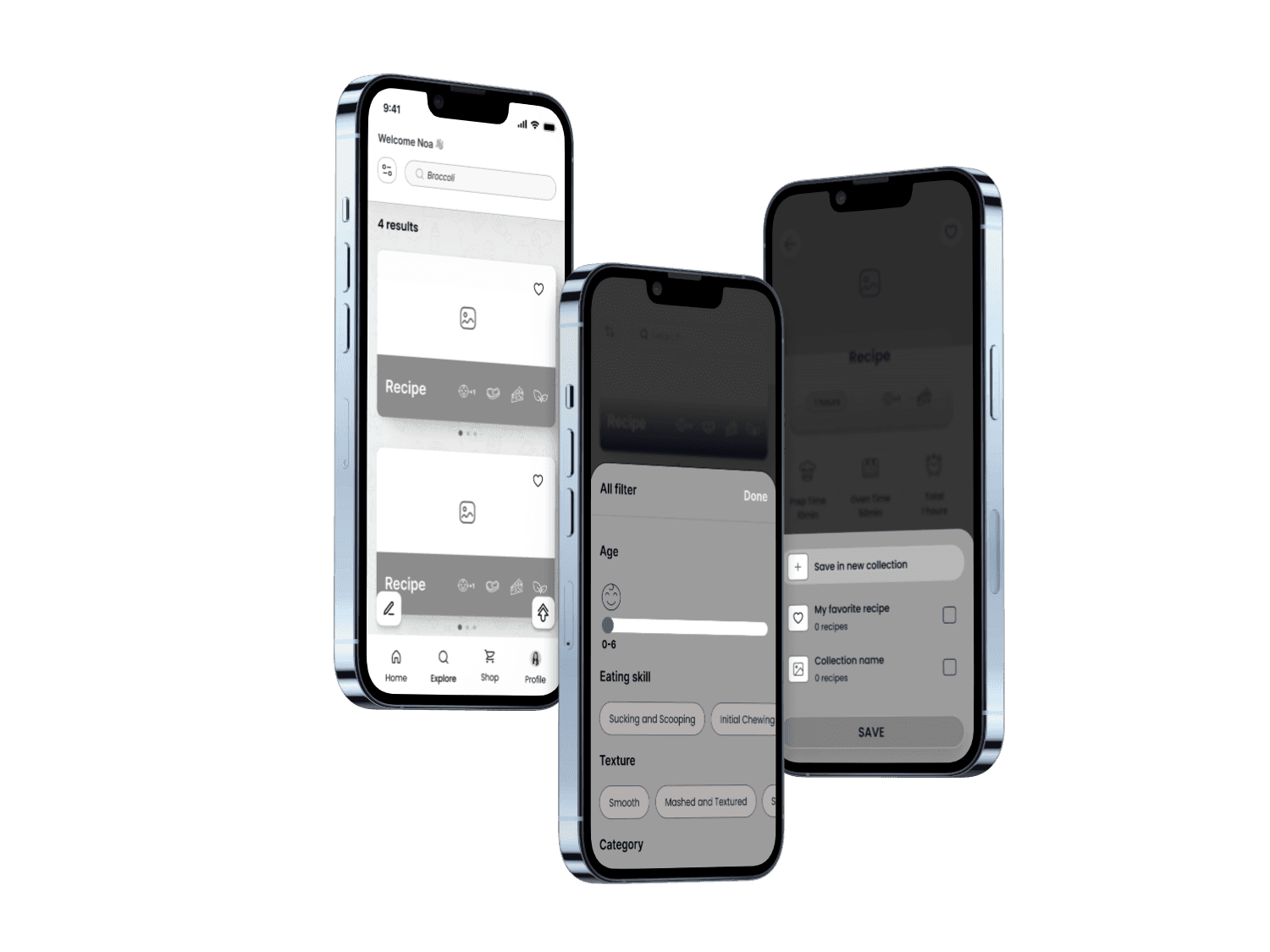
Throughout the creation of the Wireframe, my idea was always to think about how to create screens that are simple and clear, in order to provide an easy and convenient user experience and make the app beloved by parents.
As part of this, I also tried to think about which features would help achieve this goal, so that parents would find the app convenient, efficient, and fun to use on a daily basis.
Highlights
This section introduces the core screens of the app, highlighting its concept, key features, and user experience designed for busy parents looking for simple and practical solutions. The selected screens reflect the essence of the app - personalized recipes, easy saving and searching, and one-click actions.
The login screen
displays a cute animation related to babies and food, which immediately grabs attention and creates a desire to log in and start using the app.
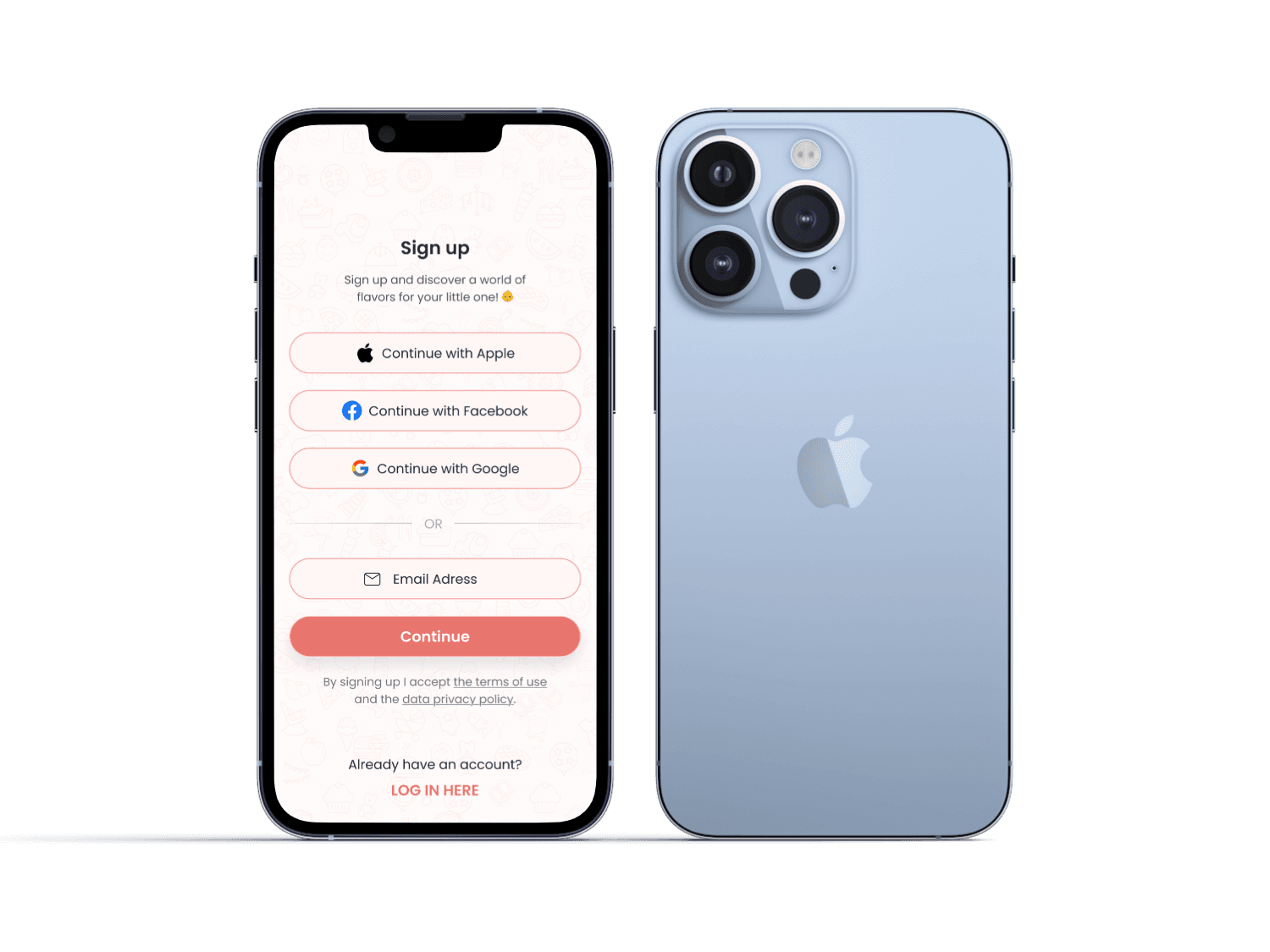
The onboarding login screen
offers simple sign-in options, allowing users to choose the best method for them, providing a quick and easy login experience that helps users feel comfortable and focused on their first interaction with the app.
The profile
screen
presents a simple registration process where users can fill in details and upload a picture, allowing them to set up their profile and start using the app immediately.
The search screen
offers a clear, accessible search with personalized filters and the option to save favorite recipes.
Click the dots to explore the different features.
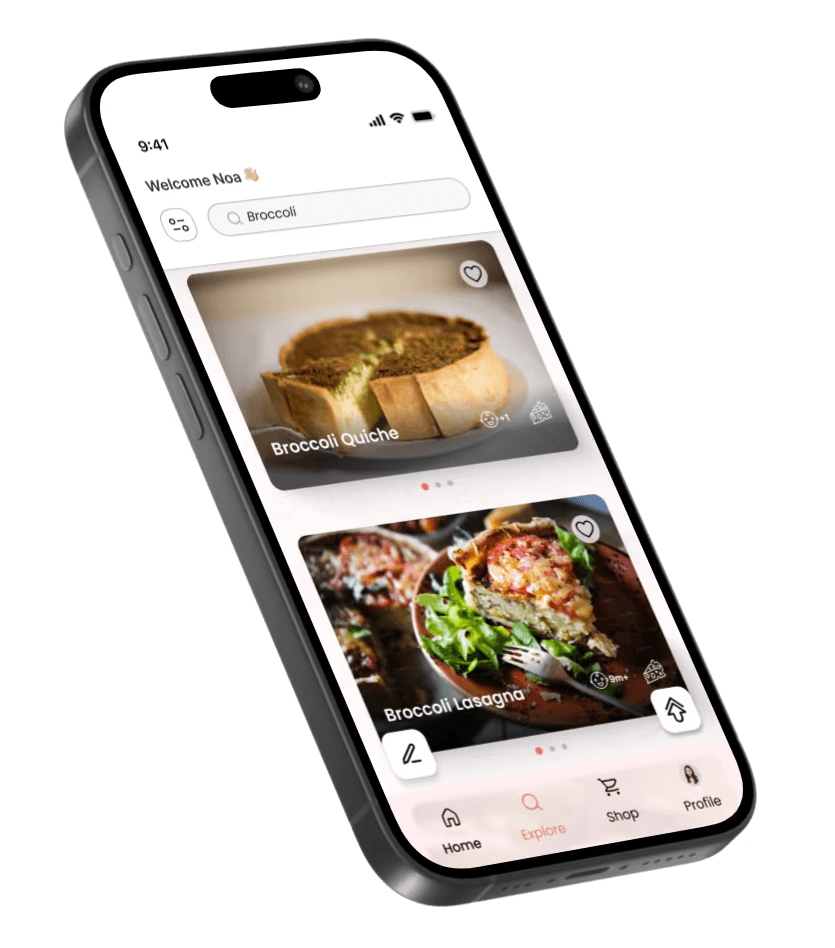
Search by Ingredient
For the convenience of parents, there is an option to search for recipes by ingredient, and results will show all recipes that contain the specific ingredient chosen by the parent.
The filters screen
displays filters to sort recipes by category (age, sensitivities, preparation time, etc.), allowing parents to tailor recipes to their child's developmental stage and personal preferences.
Some of the filters are presented in an interactive and fun way, such as sliders, icons, which creating a fun and user-friendly experience.
The recipe screen
displays recipe steps and ingredients in a clear, user-friendly layout. Users can mark ingredients they have already added and remove them from the list to easily keep track of what has been used and what is still missing - helping to reduce confusion during preparation.
Additionally, users can see the nutritional values of each recipe - a feature added in response to user research, in which many parents expressed a strong desire to better understand the nutritional content of their baby's meals.
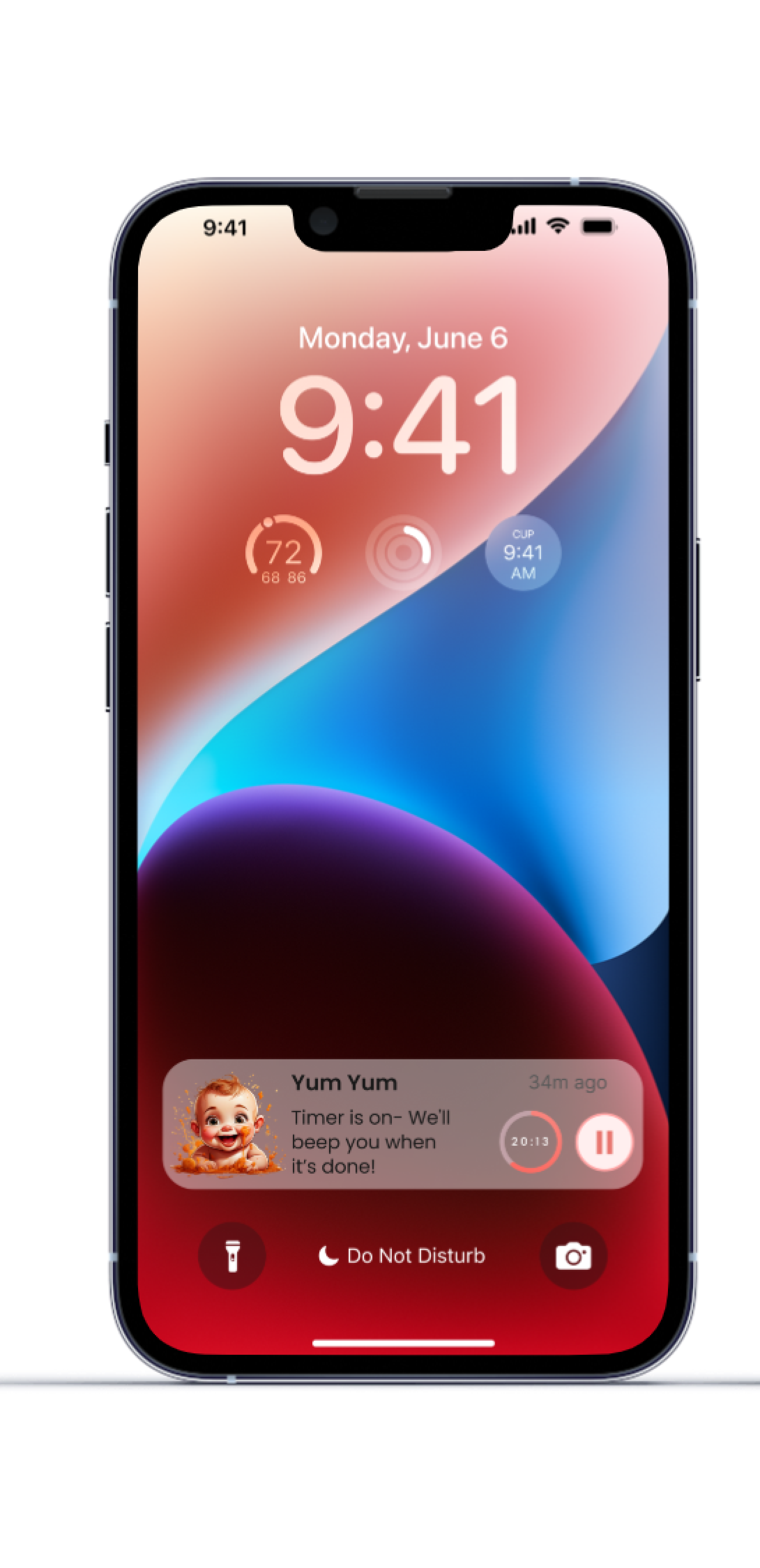
At
the bottom of the screen, a built-in timer button allows users to start cooking without having to switch to an external clock app, keeping the entire experience within the app.
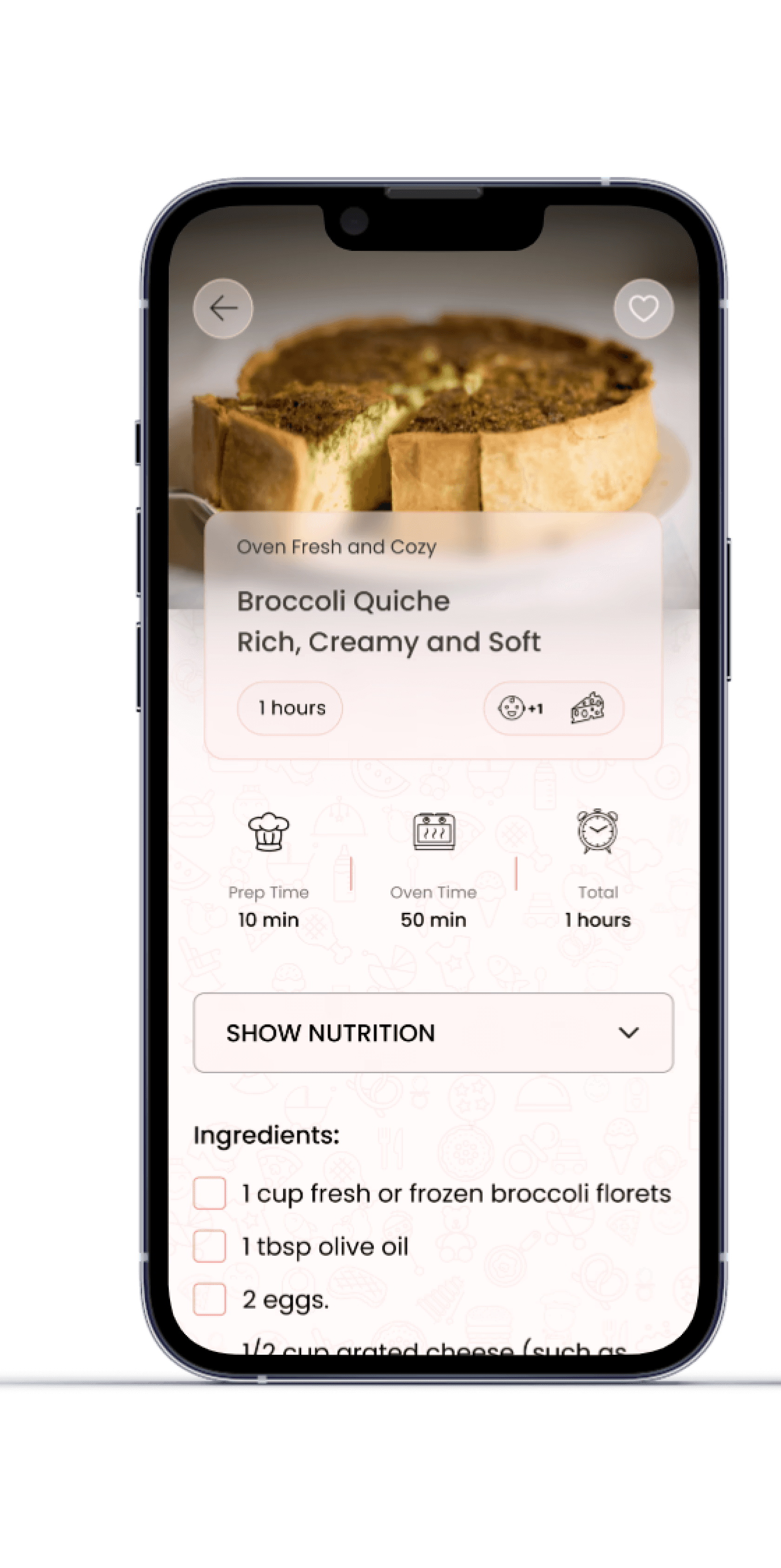
Recipe Name
The recipe name appears prominently along with cute icons that show its category.
Tips
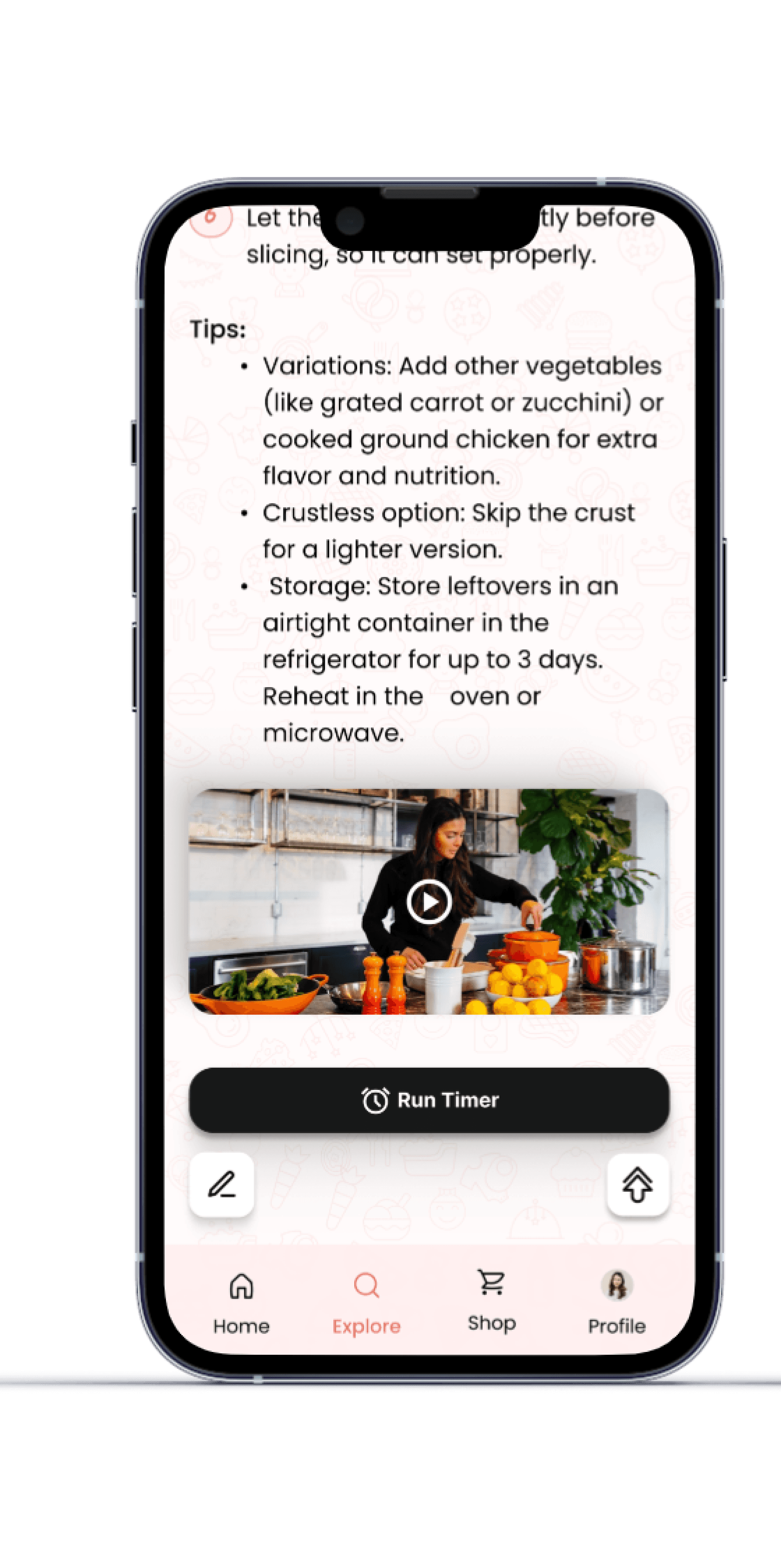
Tips were added to the recipe for parents in order to ease the preparation process and adapt it to their personal needs – with various recommendations intended to simplify, streamline, and make cooking more convenient and pleasant.
Saved Recipes Screen
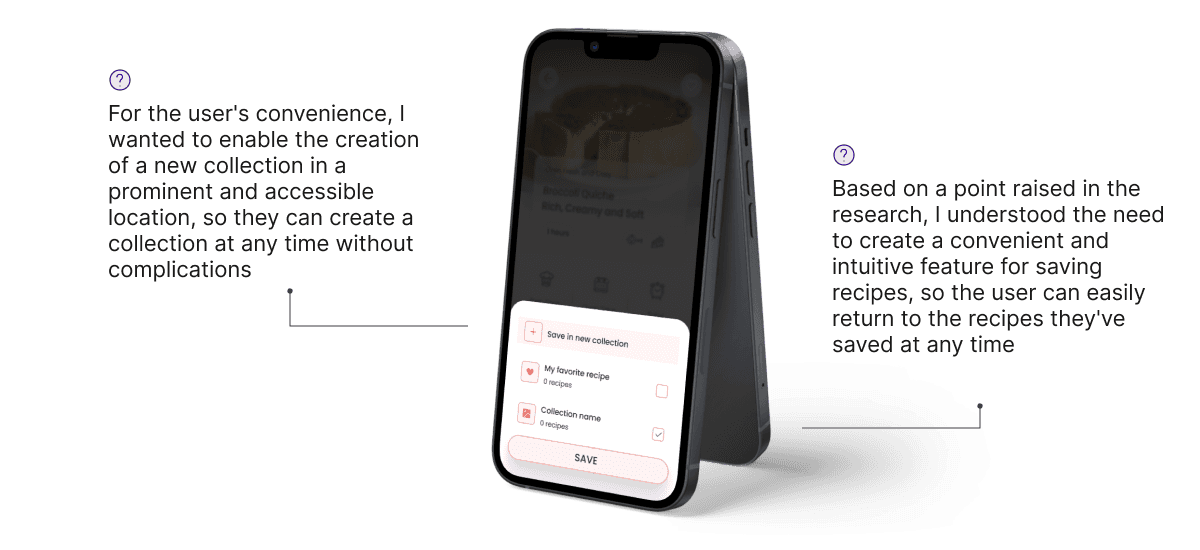
This screen showcases the option to save recipes. When tapping the heart icon, an animation plays where the heart drops into the profile icon in the bottom menu – visually confirming the save action in a pleasant way.
This feature was developed based on user research, where many parents expressed a need for an easy way to save and revisit favorite recipes.
The shop screen
displays a variety of gifts that users can purchase using coins earned through active participation in the app - such as saving recipes, using different features, and consistent engagement.
The goal is to encourage involvement and reward regular use in a fun and motivating way - because after all, who doesn’t love gifts?
This screen shows the selected gift with a description and a button that leads directly to the purchase process
The order screen
displays a message confirming that the order has been successfully sent, along with the user's current coin balance, while showing pleasant animations that enhance the user experience.
On the profile screen
the user can view all the items they’ve saved, organized by categories, making it easy to find and access them quickly.
YumYum App
Simple, Healthy and varied recipes for your baby!
A Project With Personal Meaning
User Research
The following screens showcase the survey I conducted with parents of infants, mapping their pain points, desires, and needs when using the recipe app. The key insights from this research informed the app’s feature specification, design, and overall user experience.
Problem
Shows parents' need for an organized recipe platform with a save option
Solution
I designed an organized recipe library with clear categories and the option to save recipes, so parents can easily revisit their favorite recipes at any time
Problem
The data highlights parents' need for simple and quick recipes
Solution
I incorporated a filter option by preparation time in the app, allowing parents to easily find simple and quick recipes that fit into their busy daily routine.
Problem
Reinforces the need for an accessible platform with baby recipes in one place
Solution
I designed a centralized and user-friendly platform that includes all the recipes in one place – with clear navigation and filters by age and developmental stage, to provide an efficient and pleasant user experience for parents.
Problem
Emphasizes the importance of combining short preparation time with high nutritional value for parents
Solution
I created a recipe display that includes preparation time and nutritional information, so parents can choose recipes that are both quick to prepare and provide high nutritional value for their baby.
Problem
Indicates the need for quick, nutritious, healthy, and diverse recipes for babies
Solution
I developed an interface that displays a wide variety of baby recipes, with the option to filter by health, nutritional ingredients, preparation time, and dish types – to ensure variety, nutritional value, and quick preparation availability.
Problem
Demonstrates the most convenient way for parents to view recipes
Solution
I designed a clear recipe display with a title, suitable age, ingredient list, and simple instructions, so parents can quickly determine if the recipe is right for them – even while cooking.
Problem
Once again, highlights parents' need to save recipes for future use.
Solution
I added an option to save recipes as favorites, presented in an appealing way with a pleasant animation, along with the ability to add personal notes, allowing parents to collect favorite recipes, make changes, and easily return to them.
From Needs Specification to User Experience Design
Although this was an educational project, I wanted to gain a real understanding of the field, so I conducted research with young parents to identify their challenges in finding healthy, age-appropriate recipes. Based on the insights gathered, I created a specification document detailing their pain points, needs, and design ideas, which ultimately guided the development of the app.
Pain Points
Difficulty finding healthy, varied, and delicious recipes that are tailored exactly to my child based on his status and age category.
A desire to resolve the initial confusion as a parent, and resolve the fear of feeding the child inaccurate food that could harm him.
There is no dedicated platform for parents that contains all the relevant information.
A Solution for Easily and Efficiently Finding Recipes for your Baby
Since a large portion of my research indicated a need for a solution to these problems, I took it on as a project to design and develop an app that would address the needs identified in the research.
Persona
In the context of the research I conducted, three main personas emerged:
Mom, Dad, and Grandmother.
Mother
Yael.
Age: 32
Occupation:
Full-time Registered Nurse at a public hospital. Mother of a 2-year-old toddler and a 7-month-old baby.
About the persona:
Yael is very busy balancing work and caring for her baby. She is always looking for ways to save time in the kitchen without compromising on her child's health.
Why the app is suitable for her? The app allows her to find simple, healthy, and quick recipes tailored to her baby's age, with the option to save her favorite recipes for future use. It saves her time and ensures she is feeding her baby healthy food.
Grandmother
Rachel.
Age: 62
Occupation:
Retired, grandmother of a 6-month-old baby boy.
About the persona:
Rachel is very involved in her grandson’s life and cooks for him almost every day. She is looking for baby-friendly recipes and prefers clear recipes with simple instructions, suitable for her generation.
Why the app is suitable for her? The app provides her with the tools to prepare nutritious and simple food for her grandson. She appreciates the ability to save recipes she’s tried and revisit them later. She also values the modern and clear organization of the recipes, which makes it easier for her to stay updated.
Father
David.
Age: 34
Occupation:
Project Manager in engineering, father to a 7-month-old baby girl.
About the persona:
David is very involved in raising his child, but he’s not always sure what’s suitable for her at this stage of her growth in terms of food. He wants solutions that are quick and efficient
Why the app is suitable for him? The app offers recipes that are perfectly suited to his daughter's age, with the option to filter by ingredients available at home. He likes the ability to save recipes and track his baby’s progress, which helps him make decisions about her nutrition.
Wireframe
This stage represents the early planning of the user experience, focusing on layout, screen flow, and content structure, before moving on to user interface design decisions
The
Wireframe stage is a preliminary step in the design process, where I defined the structure of the screens and the core functionality of the app in a simple and focused way, before moving on to the visual design.
Even
before choosing colors, fonts, or design elements, it was important for me to develop the idea and build the product at its core.
I
created screens, cards, and features based on what I envisioned, with a focus on user experience and flow, ensuring that every part serves the app’s purpose in a pleasant, clear, and intuitive way.
Throughout the creation of the Wireframe, my idea was always to think about how to create screens that are simple and clear, in order to provide an easy and convenient user experience and make the app beloved by parents.
As part of this, I also tried to think about which features would help achieve this goal, so that parents would find the app convenient, efficient, and fun to use on a daily basis.
Highlights
This section introduces the core screens of the app, highlighting its concept, key features, and user experience designed for busy parents looking for simple and practical solutions. The selected screens reflect the essence of the app - personalized recipes, easy saving and searching, and one-click actions.
The login screen
displays a cute animation related to babies and food, which immediately grabs attention and creates a desire to log in and start using the app.
The onboarding login screen
offers simple sign-in options, allowing users to choose the best method for them, providing a quick and easy login experience that helps users feel comfortable and focused on their first interaction with the app.
The profile
screen
presents a simple registration process where users can fill in details and upload a picture, allowing them to set up their profile and start using the app immediately.
The search screen
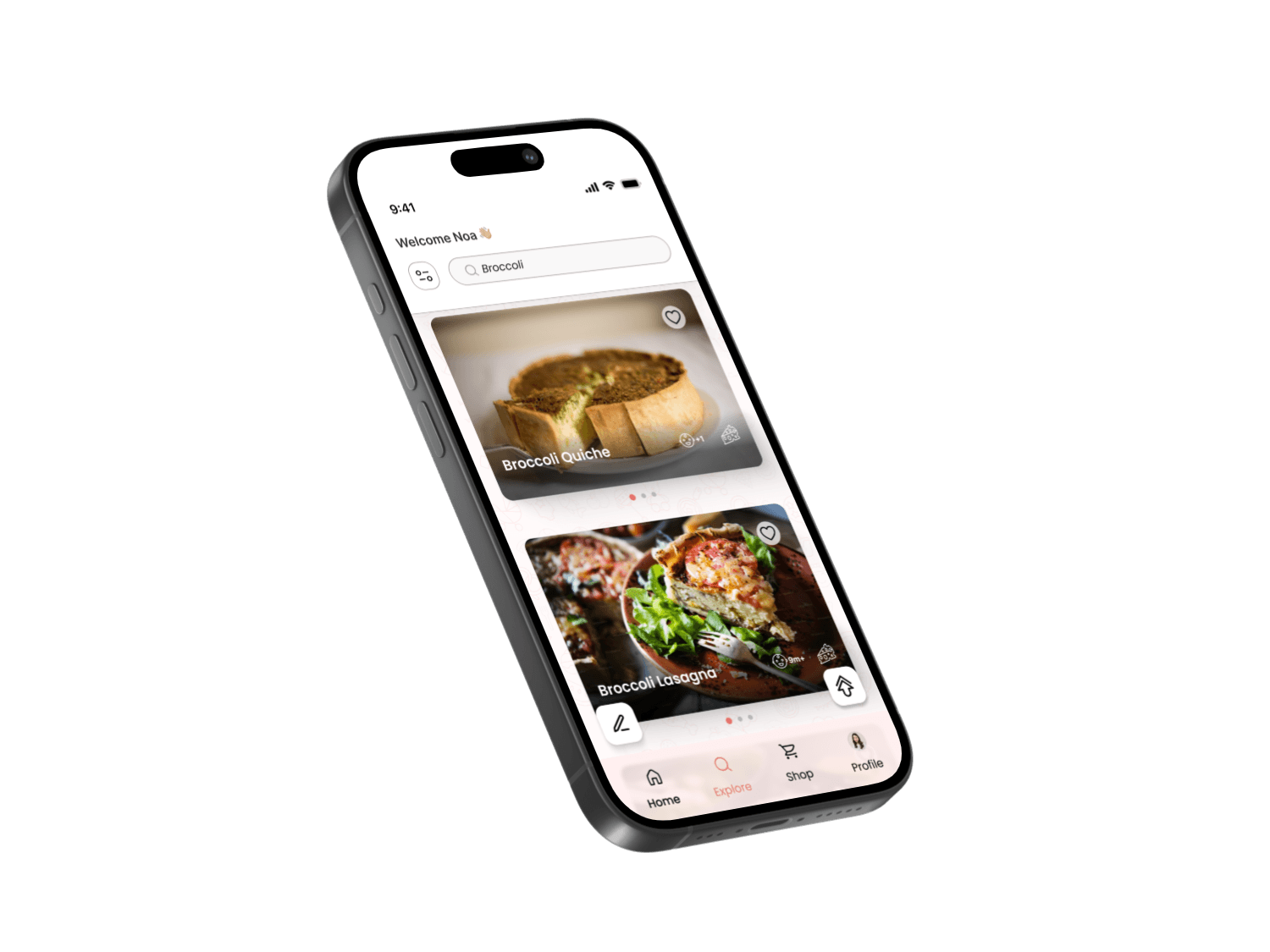
offers a clear, accessible search with personalized filters and the option to save favorite recipes.
Click the dots to explore the different features.
Search by Ingredient
For the convenience of parents, there is an option to search for recipes by ingredient, and results will show all recipes that contain the specific ingredient chosen by the parent.
Search by Ingredient
For the convenience of parents, there is an option to search for recipes by ingredient, and results will show all recipes that contain the specific ingredient chosen by the parent.
The filters screen
displays filters to sort recipes by category (age, sensitivities, preparation time, etc.), allowing parents to tailor recipes to their child's developmental stage and personal preferences.
Some of the filters are presented in an interactive and fun way, such as sliders, icons, which creating a fun and user-friendly experience.
The recipe screen
displays recipe steps and ingredients in a clear, user-friendly layout. Users can mark ingredients they have already added and remove them from the list to easily keep track of what has been used and what is still missing – helping to reduce confusion during preparation.
Additionally, users can see the nutritional values of each recipe - a feature added in response to user research, in which many parents expressed a strong desire to better understand the nutritional content of their baby's meals.
At
the bottom of the screen, a built-in timer button allows users to start cooking without having to switch to an external clock app, keeping the entire experience within the app.
Tips
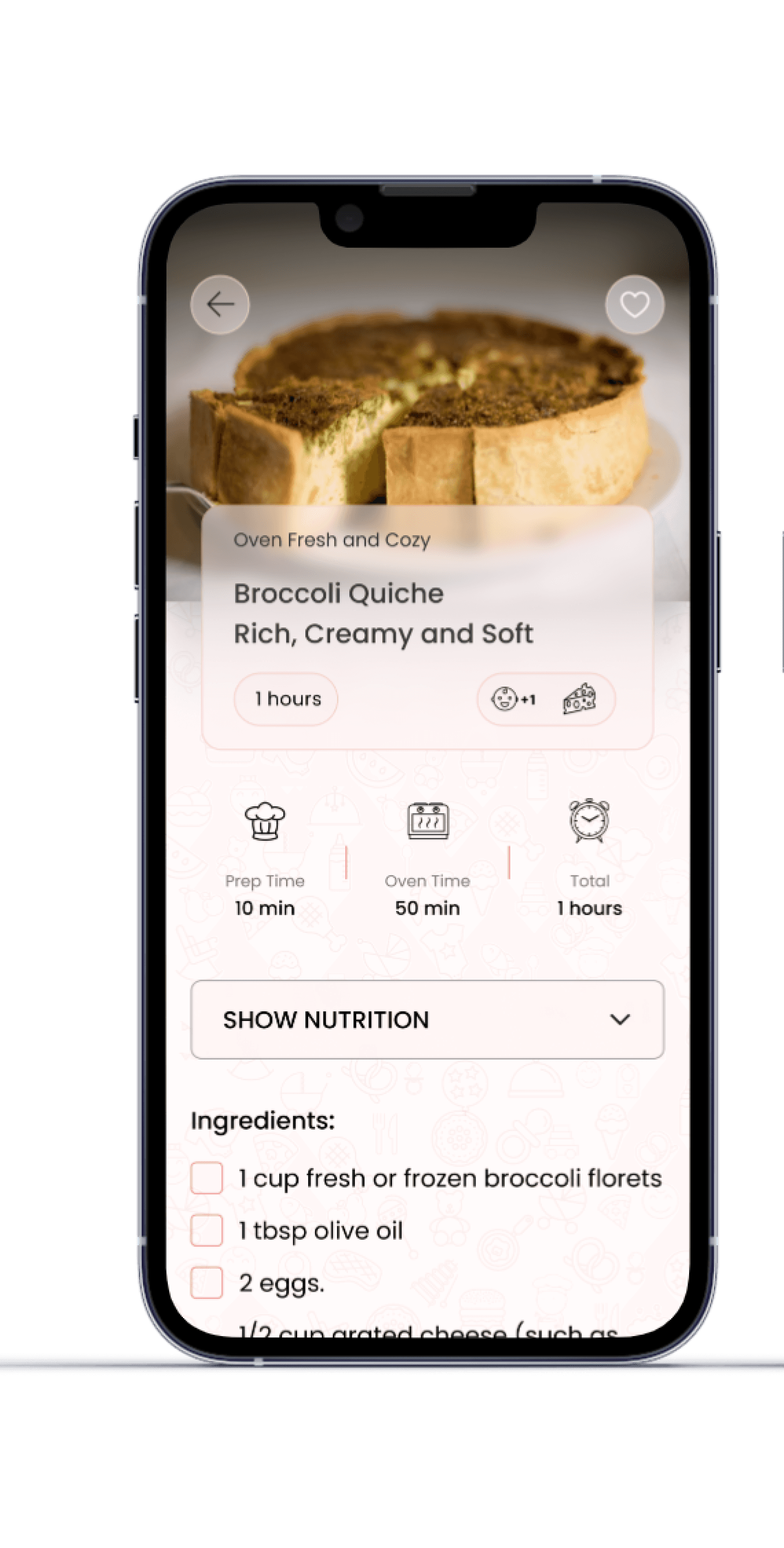
Tips were added to the recipe for parents in order to ease the preparation process and adapt it to their personal needs – with various recommendations intended to simplify, streamline, and make cooking more convenient and pleasant.
Tips
Tips were added to the recipe for parents in order to ease the preparation process and adapt it to their personal needs – with various recommendations intended to simplify, streamline, and make cooking more convenient and pleasant.
Saved Recipes Screen
This screen showcases the option to save recipes. When tapping the heart icon, an animation plays where the heart drops into the profile icon in the bottom menu – visually confirming the save action in a pleasant way.
This feature was developed based on user research, where many parents expressed a need for an easy way to save and revisit favorite recipes.
The shop screen
displays a variety of gifts that users can purchase using coins earned through active participation in the app - such as saving recipes, using different features, and consistent engagement.
The goal is to encourage involvement and reward regular use in a fun and motivating way - because after all, who doesn’t love gifts?
This screen shows the selected gift with a description and a button that leads directly to the purchase process
displays a message confirming that the order has been successfully sent, along with the user's current coin balance, while showing pleasant animations that enhance the user experience.
The order screen
On the profile screen
the user can view all the items they’ve saved, organized by categories, making it easy to find and access them quickly.
YumYum App
Simple, Healthy and varied recipes for your baby!
A Project With Personal Meaning
User Research
The following screens showcase the survey I conducted with parents of infants, mapping their pain points, desires, and needs when using the recipe app. The key insights from this research informed the app’s feature specification, design, and overall user experience.
Problem
Shows parents' need for an organized recipe platform with a save option
Solution
I designed an organized recipe library with clear categories and the option to save recipes, so parents can easily revisit their favorite recipes at any time
Problem
The data highlights parents' need for simple and quick recipes
Solution
I incorporated a filter option by preparation time in the app, allowing parents to easily find simple and quick recipes that fit into their busy daily routine.
Problem
Reinforces the need for an accessible platform with baby recipes in one place
Solution
I designed a centralized and user-friendly platform that includes all the recipes in one place – with clear navigation and filters by age and developmental stage, to provide an efficient and pleasant user experience for parents.
Problem
Emphasizes the importance of combining short preparation time with high nutritional value for parents
Solution
I created a recipe display that includes preparation time and nutritional information, so parents can choose recipes that are both quick to prepare and provide high nutritional value for their baby.
Problem
Indicates the need for quick, nutritious, healthy, and diverse recipes for babies
Solution
I developed an interface that displays a wide variety of baby recipes, with the option to filter by health, nutritional ingredients, preparation time, and dish types – to ensure variety, nutritional value, and quick preparation availability.
Problem
Demonstrates the most convenient way for parents to view recipes
Solution
I designed a clear recipe display with a title, suitable age, ingredient list, and simple instructions, so parents can quickly determine if the recipe is right for them – even while cooking.
Problem
Once again, highlights parents' need to save recipes for future use.
Solution
I added an option to save recipes as favorites, presented in an appealing way with a pleasant animation, along with the ability to add personal notes, allowing parents to collect favorite recipes, make changes, and easily return to them.
From Needs Specification to User Experience Design
Although this was an educational project, I wanted to gain a real understanding of the field.
So I conducted research with young parents to identify their challenges in finding healthy, age-appropriate recipes. Based on the insights gathered, I created a specification document detailing their pain points, needs, and design ideas, which ultimately guided the development of the app.
Pain Points
Difficulty finding healthy, varied, and delicious recipes that are tailored exactly to my child based on his status and age category.
A desire to resolve the initial confusion as a parent, and resolve the fear of feeding the child inaccurate food that could harm him.
There is no dedicated platform for parents that contains all the relevant information.
A Solution for Easily and Efficiently Finding Recipes for your Baby
Since a large portion of my research indicated a need for a solution to these problems, I took it on as a project to design and develop an app that would address the needs identified in the research.
Mother
Yael.
Age: 32
Occupation:
Full-time Registered Nurse at a public hospital. Mother of a 2-year-old toddler and a 7-month-old baby.
About the persona:
Yael is very busy balancing work and caring for her baby. She is always looking for ways to save time in the kitchen without compromising on her child's health.
Why the app is suitable for her? The app allows her to find simple, healthy, and quick recipes tailored to her baby's age, with the option to save her favorite recipes for future use. It saves her time and ensures she is feeding her baby healthy food.
Grandmother
Rachel.
Age: 62
Occupation:
Retired, grandmother of a 6-month-old baby boy.
About the persona:
Rachel is very involved in her grandson’s life and cooks for him almost every day. She is looking for baby-friendly recipes and prefers clear recipes with simple instructions, suitable for her generation.
Why the app is suitable for her? The app provides her with the tools to prepare nutritious and simple food for her grandson. She appreciates the ability to save recipes she’s tried and revisit them later. She also values the modern and clear organization of the recipes, which makes it easier for her to stay updated.
Father
David.
Age: 34
Occupation:
Project Manager in engineering, father to a 7-month-old baby girl.
About the persona:
David is very involved in raising his child, but he’s not always sure what’s suitable for her at this stage of her growth in terms of food. He wants solutions that are quick and efficient
Why the app is suitable for him? The app offers recipes that are perfectly suited to his daughter's age, with the option to filter by ingredients available at home. He likes the ability to save recipes and track his baby’s progress, which helps him make decisions about her nutrition.
Persona
In the context of the research I conducted, three main personas emerged:
Mom, Dad, and Grandmother.
Wireframe
This stage represents the early planning of the user experience, focusing on layout, screen flow, and content structure, before moving on to user interface design decisions
The
Wireframe stage is a preliminary step in the design process, where I defined the structure of the screens and the core functionality of the app in a simple and focused way, before moving on to the visual design.
Even
before choosing colors, fonts, or design elements, it was important for me to develop the idea and build the product at its core.
I
created screens, cards, and features based on what I envisioned, with a focus on user experience and flow, ensuring that every part serves the app’s purpose in a pleasant, clear, and intuitive way.
Throughout the creation of the Wireframe, my idea was always to think about how to create screens that are simple and clear, in order to provide an easy and convenient user experience and make the app beloved by parents.
As part of this, I also tried to think about which features would help achieve this goal, so that parents would find the app convenient, efficient, and fun to use on a daily basis.
Highlights
This section introduces the core screens of the app, highlighting its concept, key features, and user experience designed for busy parents looking for simple and practical solutions. The selected screens reflect the essence of the app - personalized recipes, easy saving and searching, and one-click actions.
The login screen
displays a cute animation related to babies and food, which immediately grabs attention and creates a desire to log in and start using the app.
The onboarding login screen
offers simple sign-in options, allowing users to choose the best method for them, providing a quick and easy login experience that helps users feel comfortable and focused on their first interaction with the app.
The profile screen
presents a simple registration process where users can fill in details and upload a picture, allowing them to set up their profile and start using the app immediately.
The search screen
offers a clear, accessible search with personalized filters and the option to save favorite recipes.
Click the dots to explore the different features.
Search by Ingredient
For the convenience of parents, there is an option to search for recipes by ingredient, and results will show all recipes that contain the specific ingredient chosen by the parent.
Search by Ingredient
For the convenience of parents, there is an option to search for recipes by ingredient, and results will show all recipes that contain the specific ingredient chosen by the parent.
The filters screen
displays filters to sort recipes by category (age, sensitivities, preparation time, etc.), allowing parents to tailor recipes to their child's developmental stage and personal preferences.
Some of the filters are presented in an interactive and fun way, such as sliders, icons, which creating a fun and user-friendly experience.
The recipe screen
displays recipe steps and ingredients in a clear, user-friendly layout. Users can mark ingredients they have already added and remove them from the list to easily keep track of what has been used and what is still missing – helping to reduce confusion during preparation.
Additionally, users can see the nutritional values of each recipe - a feature added in response to user research, in which many parents expressed a strong desire to better understand the nutritional content of their baby's meals.
At
the bottom of the screen, a built-in timer button allows users to start cooking without having to switch to an external clock app, keeping the entire experience within the app.
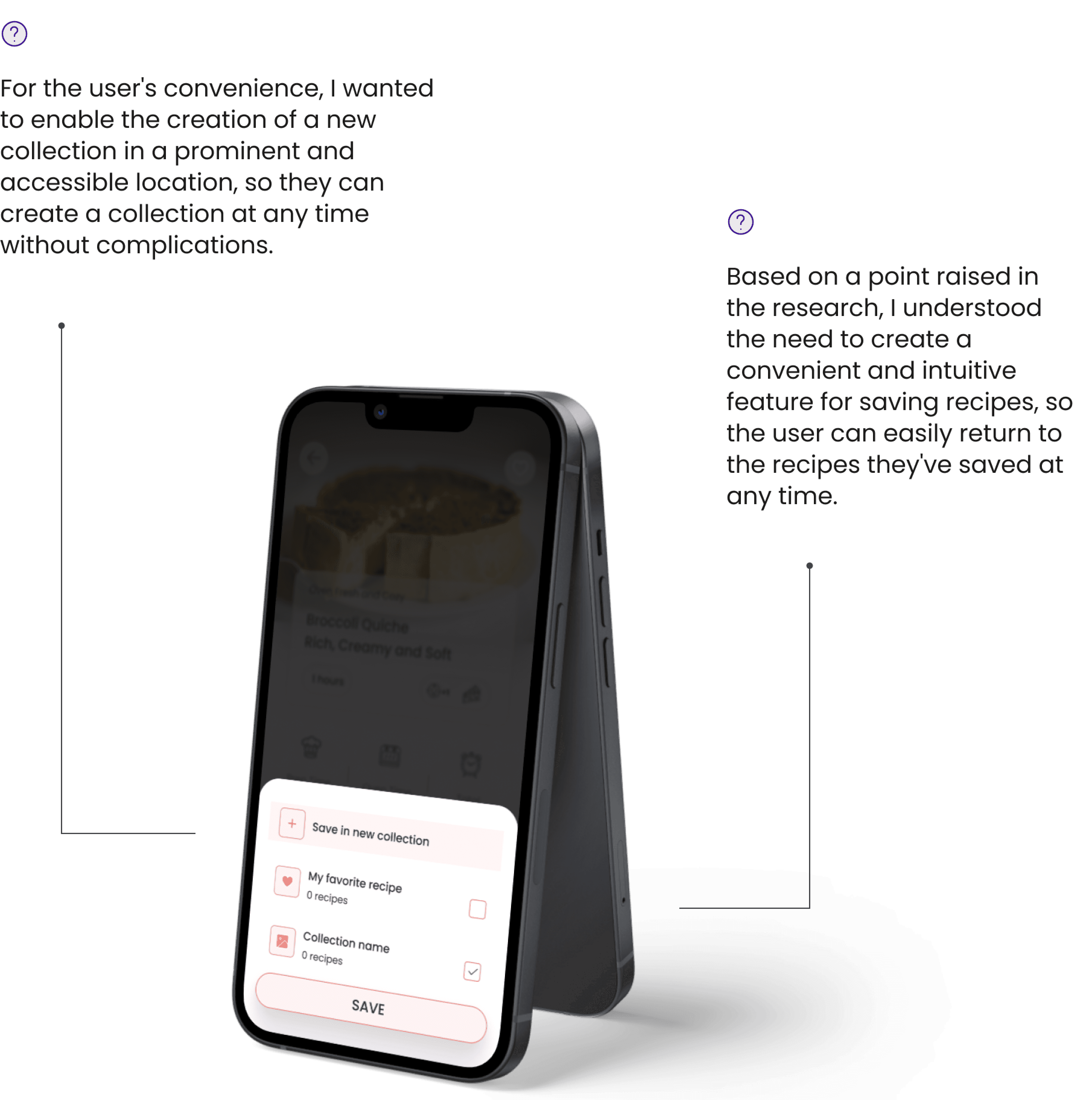
Saved Recipes Screen
This screen showcases the option to save recipes. When tapping the heart icon, an animation plays where the heart drops into the profile icon in the bottom menu – visually confirming the save action in a pleasant way.
This feature was developed based on user research, where many parents expressed a need for an easy way to save and revisit favorite recipes.
The shop screen
displays a variety of gifts that users can purchase using coins earned through active participation in the app - such as saving recipes, using different features, and consistent engagement.
The goal is to encourage involvement and reward regular use in a fun and motivating way - because after all, who doesn’t love gifts?
This screen shows the selected gift with a description and a button that leads directly to the purchase process
The order screen
displays a message confirming that the order has been successfully sent, along with the user's current coin balance, while showing pleasant animations that enhance the user experience.
On the profile screen
the user can view all the items they’ve saved, organized by categories, making it easy to find and access them quickly.