DormiCare – Sleep
Monitoring System
Streamlining sleep diagnostics and treatment through smart tracking
Streamlining sleep diagnostics and treatment through smart tracking
The Idea Behind DormiCare
The idea for DormiCare was born from a personal experience. Inspired by my father’s struggle with sleep apnea, DormiCare was created to help patients manage sleep disorders and improve their quality of life. DormiCare aims to improve diagnosis, treatment, and ultimately, the quality of life for people struggling with sleep issues
User Research
At the beginning of the project, I identified the core pain point- the need for an effective solution to manage sleep disorders, inspired by a personal experience with my father’s struggle with sleep issues.
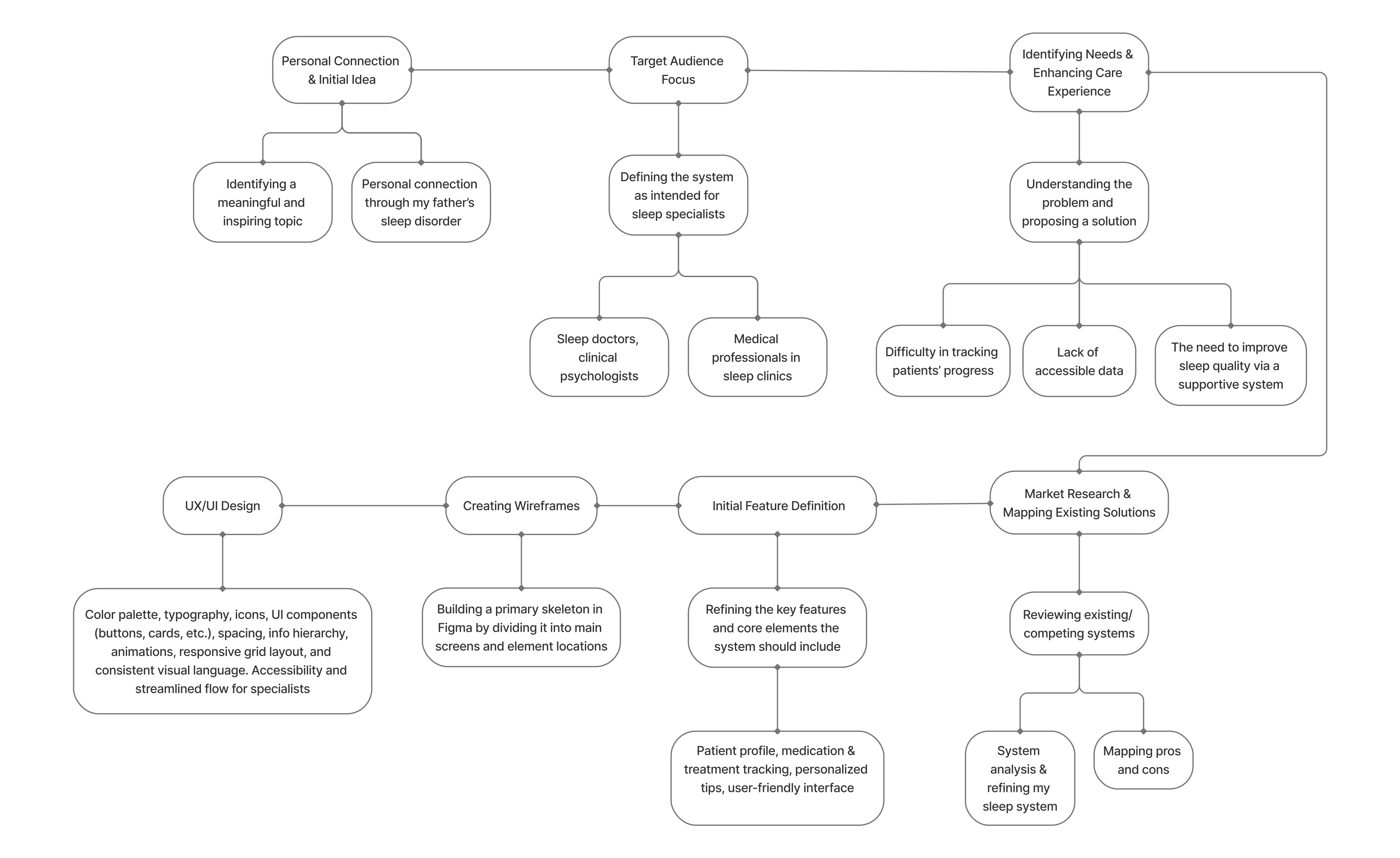
Next, I conducted market and competitor research, analyzing existing systems and their features. The goal was to understand gaps and shortcomings in current products and learn from them to design a better solution.
Finally, after gathering insights, I moved to the prototyping and design phase in Figma, where I crafted the interface and features based on the identified needs, aiming to create an intuitive, user-friendly, and efficient system for managing sleep disorders.



What is DormiCare?
DormiCare is a digital platform for sleep specialists that streamlines the clinical management of sleep disorders.
It allows professionals to open and manage patient files, classify disorders, track progress, and provide tailored treatment - all in one place.
The system also includes a built-in knowledge base with articles and visual tools to support informed, effective care.
The name DormiCare comes from Latin: "dormi" meaning “sleep” and "care" meaning just that- care. The combination reflects the platform’s core mission- to bring thoughtful, professional care to those struggling with sleep.
Pain Points
Unstructured patient data and documentation:
Patient information is scattered across forms, emails, and files, making it hard to get a clear clinical picture
Unstructured patient data and documentation:
Patient information is scattered across forms, emails, and files, making it hard to get a clear clinical picture
Unstructured patient data and documentation:
Patient information is scattered across forms, emails, and files, making it hard to get a clear clinical picture
No standardized workflow for diagnosis and follow-up:
Each specialist uses different methods to classify and track sleep disorders, making consistent care difficult
No standardized workflow for diagnosis and follow-up:
Each specialist uses different methods to classify and track sleep disorders, making consistent care difficult
No standardized workflow for diagnosis and follow-up:
Each specialist uses different methods to classify and track sleep disorders, making consistent care difficult
Limited access to reliable, centralized clinical resources:
Professionals waste valuable time searching for treatment guidelines and educational materials during care
Limited access to reliable, centralized clinical resources:
Professionals waste valuable time searching for treatment guidelines and educational materials during care
Limited access to reliable, centralized clinical resources:
Professionals waste valuable time searching for treatment guidelines and educational materials during care
User Research & UX Design Flow
User Research & UX Design Flow
User Research & UX Design Flow
Persona
While planning the system, I considered two key personas: sleep specialists and patients.
To keep the design focused and personalized, I chose to center the system around the specialists.
By providing them with an intuitive, efficient tool, they can offer better, more tailored care- ultimately helping patients improve their sleep and overall well-being.
This is, in fact, the system’s primary goal- to provide specialists with an advanced and intuitive system that leads them to better outcomes for patients.
The primary users of DormiCare are sleep physicians, neurologists, and clinical psychologists working in sleep clinics and labs - professionals focused on structured patient management and clinical documentation without the need for real-time physiological monitoring.

Dr. Amir Levi
Sleep Specialist, Head of a Sleep Clinic
About the persona:
Additional Info: Dr. Levi sees patients with a wide range of complex sleep issues. He relies on clinical interviews and long-term follow-up rather than real-time sleep monitoring. His clinic handles dozens of cases weekly, and he's looking for a way to standardize documentation and streamline care.
Why DormiCare works for him:
The system helps Dr. Levi classify disorders, provide structured recommendations, and access clinical resources quickly - all in one place. He can monitor progress over time and easily manage patient referrals.
Dr. Sara Stein
Clinical Psychologist specializing in CBT-i
About the persona:
Additional Info: Dr. Stein works with patients experiencing chronic insomnia and anxiety-related sleep disorders. She focuses on behavioral treatment approaches and collaborates regularly with sleep specialists and neurologists.
Why DormiCare works for her:
The platform allows her to view patients' sleep history and access clinical notes from referring specialists. She can add behavioral treatment plans, track outcomes, and communicate efficiently with the broader care team.
Dr. Natalia Rain
Neurologist working part-time in a multidisciplinary sleep center
About the persona:
Additional Info: Dr. Rain evaluates patients whose sleep disturbances may have neurological causes. She typically becomes involved mid-process, after an initial assessment by a sleep specialist.
Why DormiCare works for her:
DormiCare provides her with immediate access to prior clinical evaluations, symptom descriptions, and treatment history. This allows her to contribute her expertise and document follow-up notes efficiently, without wasting time searching for information or re-assessing from scratch.
Wireframe
This stage represents the early planning of the user experience, focusing on layout, screen flow, and content structure, before moving on to user interface design decisions
At
this stage, I translated initial ideas and research insights into low-fidelity wireframes.
The goal was to define the product’s structure, user flow, and layout without distractions from visual design.
I
focused on organizing content, mapping out core functionalities, and ensuring a clear and intuitive user journey - all while keeping the needs of the chosen persona in mind.
This stage included:
Grouping and prioritizing content based on relevance and frequency of use
Creating functional UI components such as tabs, cards, input fields, and buttons
Testing and refining which features best support the specialist’s tasks
Designing logical screen transitions and user journeys
Maintaining consistency in layout and spacing to support future UI design
Laying the groundwork for accessibility and responsive adaptation
By focusing on structure before visuals, I ensured a user-centered, functional flow that would seamlessly translate into high-fidelity design.
As part of the design process, I created a series of preliminary wireframes before moving into the UI stage. The process began with initial hand-drawn sketches to map ideas and screen structures, continued with basic wireframes in Figma to define key screens, and culminated in advanced high-fidelity wireframes, including detailed elements, visual hierarchy, and emphasis levels that guided the final UI design.
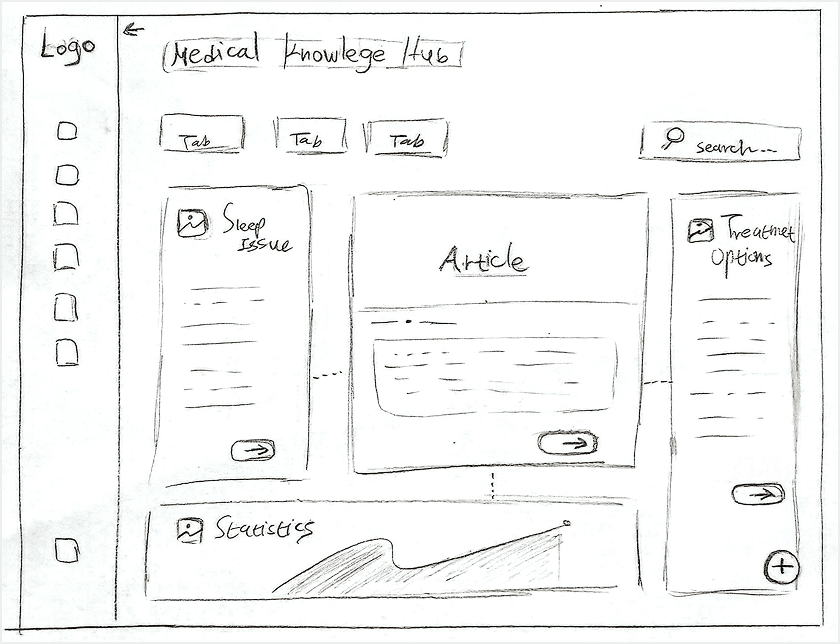
Initial sketch - manual mapping and prototyping of the system structure, showing a sample information screen for caregivers
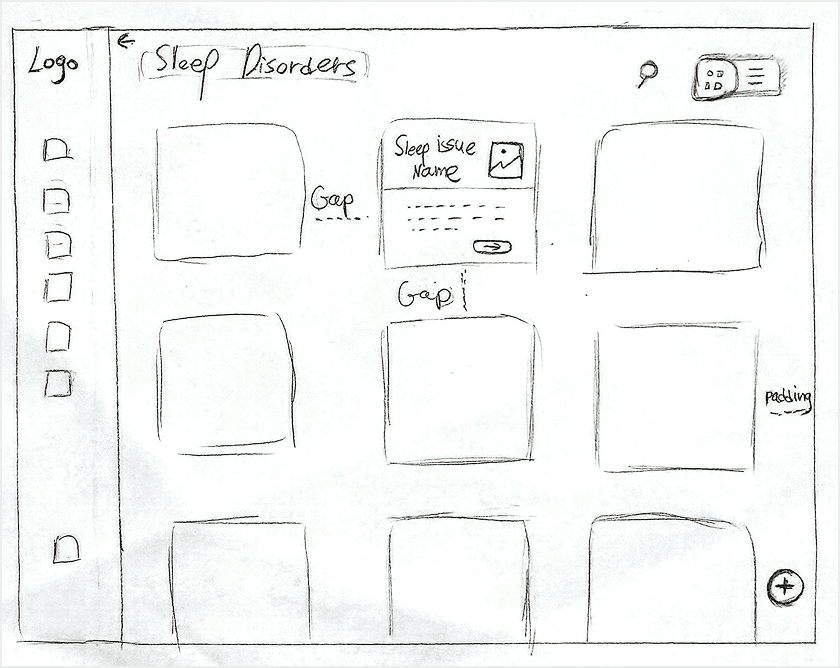
Hand-drawn sketch - design of the Sleep Issues screen in a grid layout
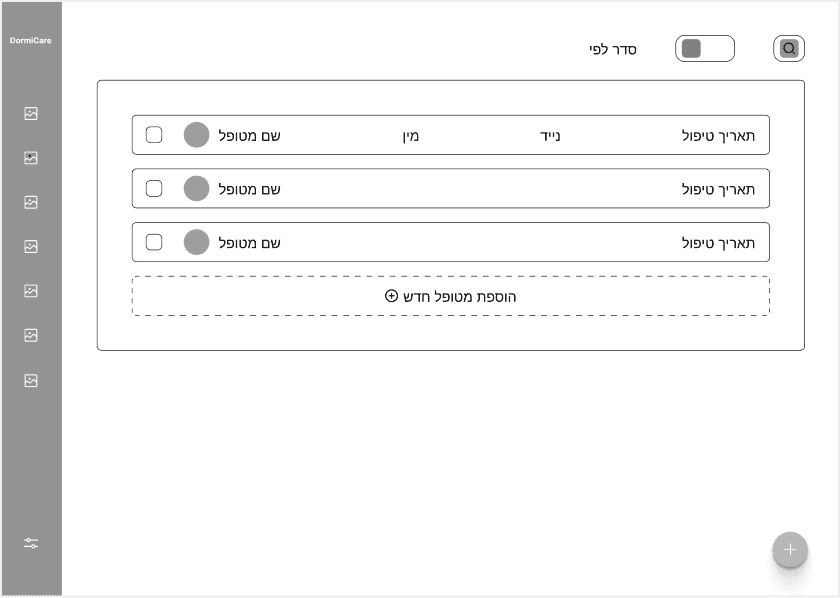
Initial sketch - mapping and prototyping of the Patients screen in a list view, early wireframe in Figma
Advanced wireframe - prototyping the Patients screen in a list view with detailed item display
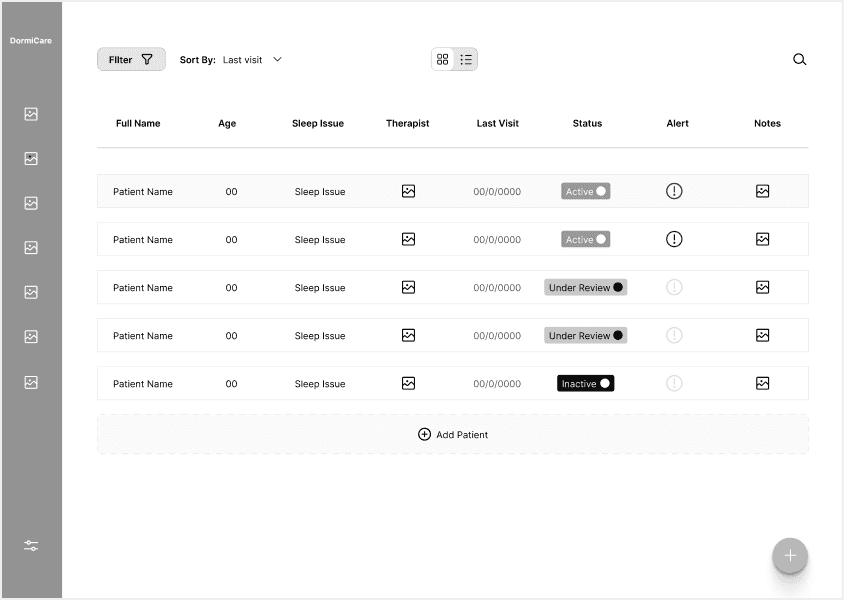
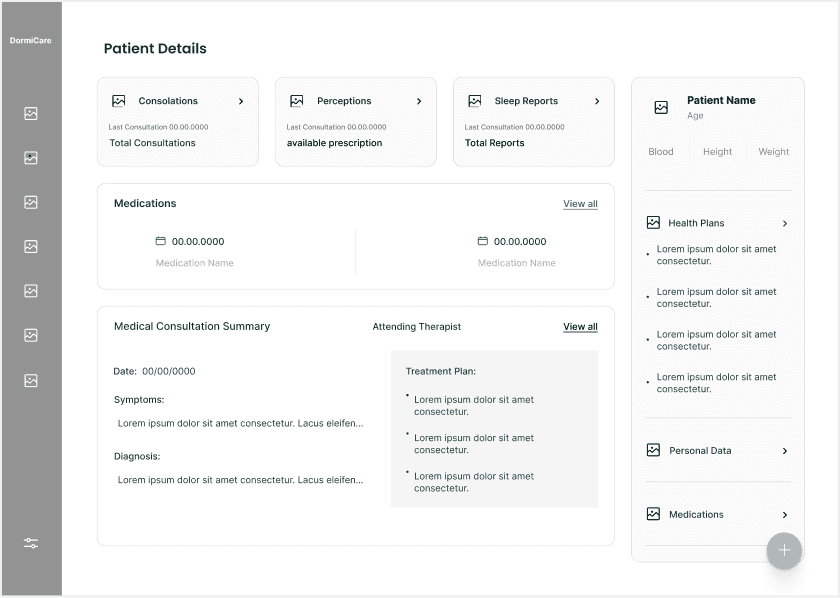
Advanced wireframe - high-fidelity screen with all elements and final layout. Even without colors, the hierarchy and emphasis for the upcoming UI design are clearly visible
Highlights
This section showcases key screens from the product, highlighting the core features and the overall structure of the system.
Each screen was carefully designed to support sleep specialists in their daily workflow- from managing patient profiles and tracking medication, to documenting treatments and generating personalized recommendations.
Together, these screens reflect the system’s main goals- improving clinical efficiency and ultimately enhancing patients’ quality of life.
Home Screen
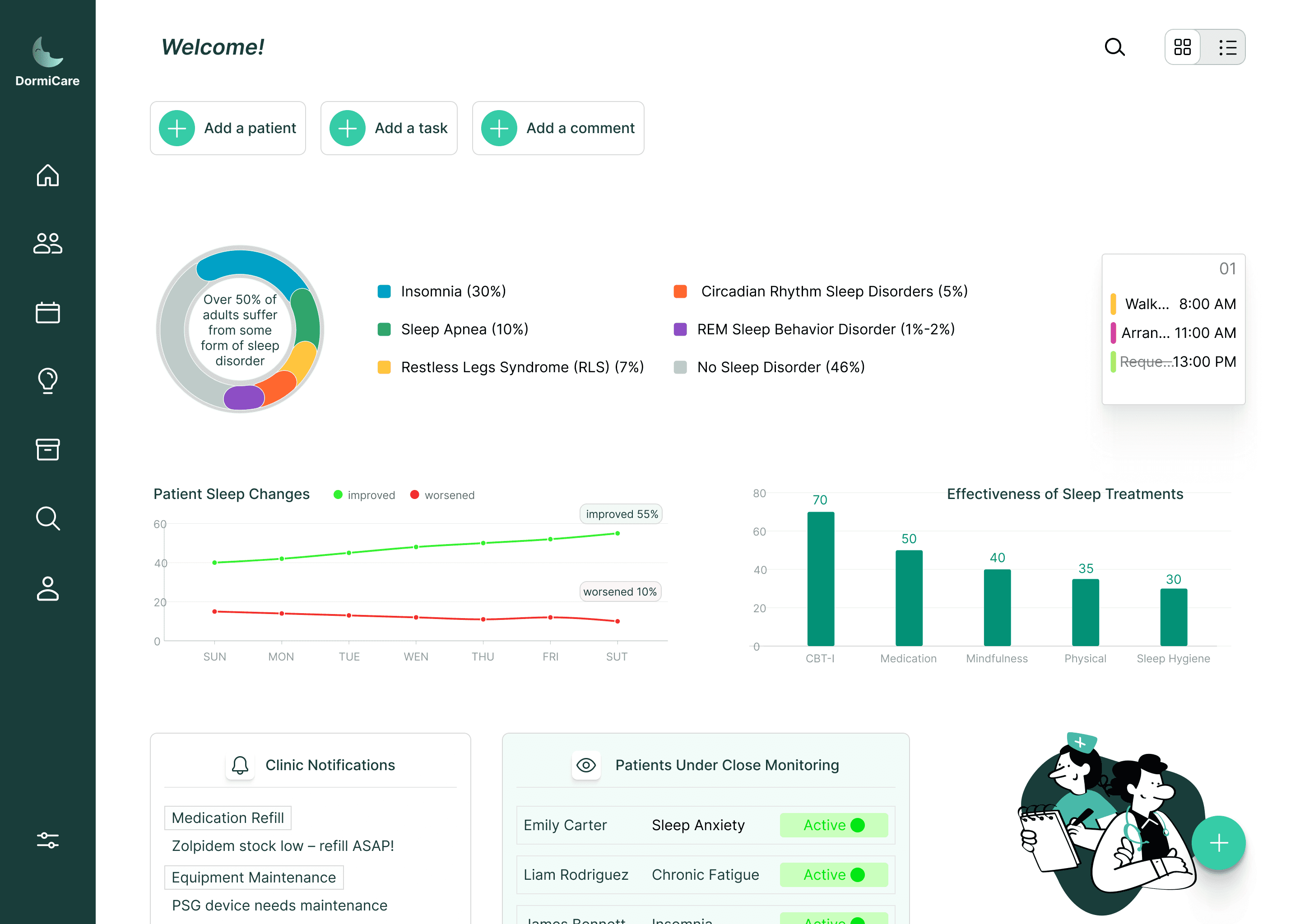
The home screen provides sleep specialists with a clear and detailed overview of their daily tasks and patient activity. It includes quick access to key sections such as patients under monitoring, alerts, a task diary for the day, the option to add a new patient, and a section of enriching information. This screen serves as the central hub of the system - designed to help professionals stay focused, organized, and efficient from the moment they log in.
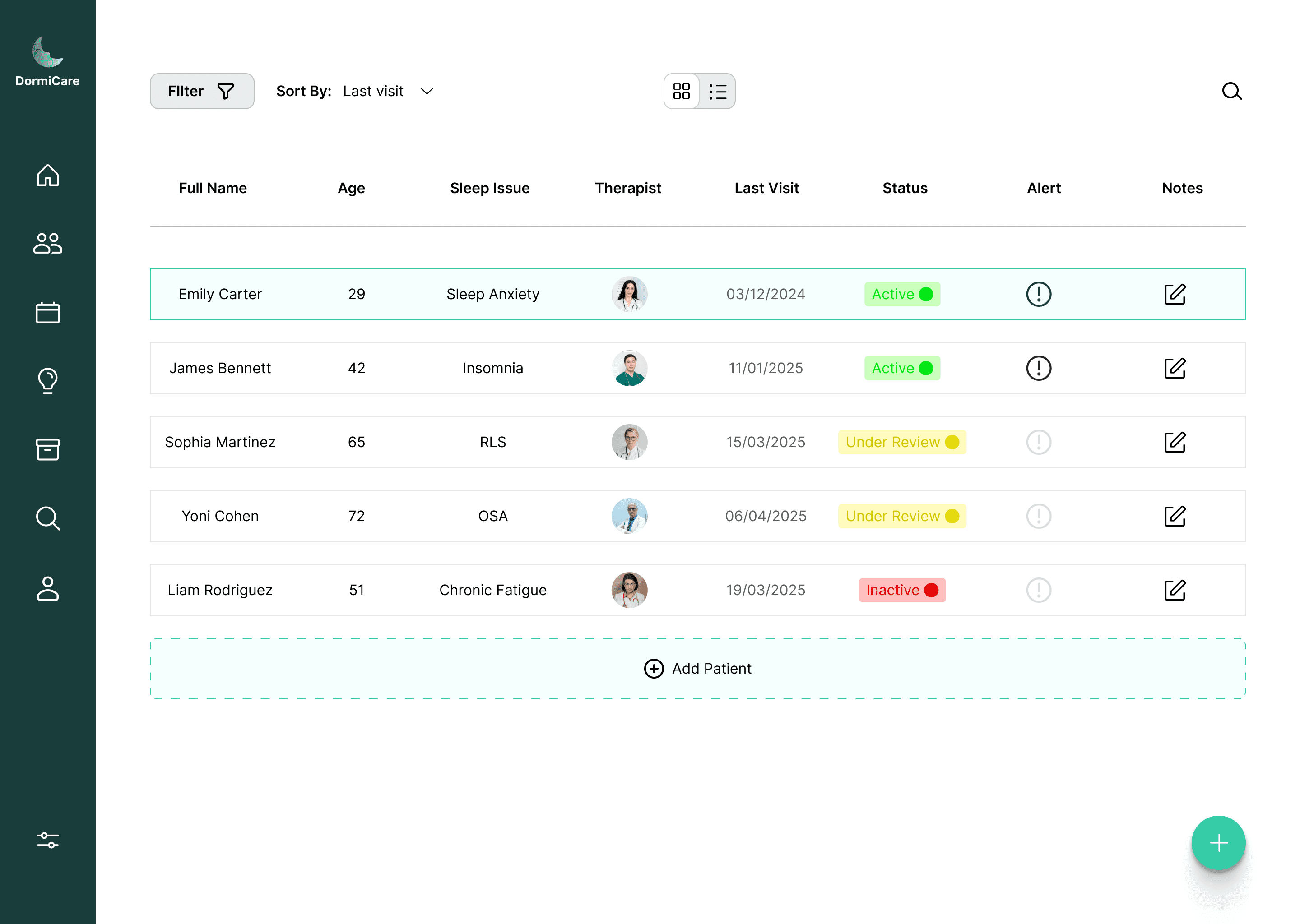
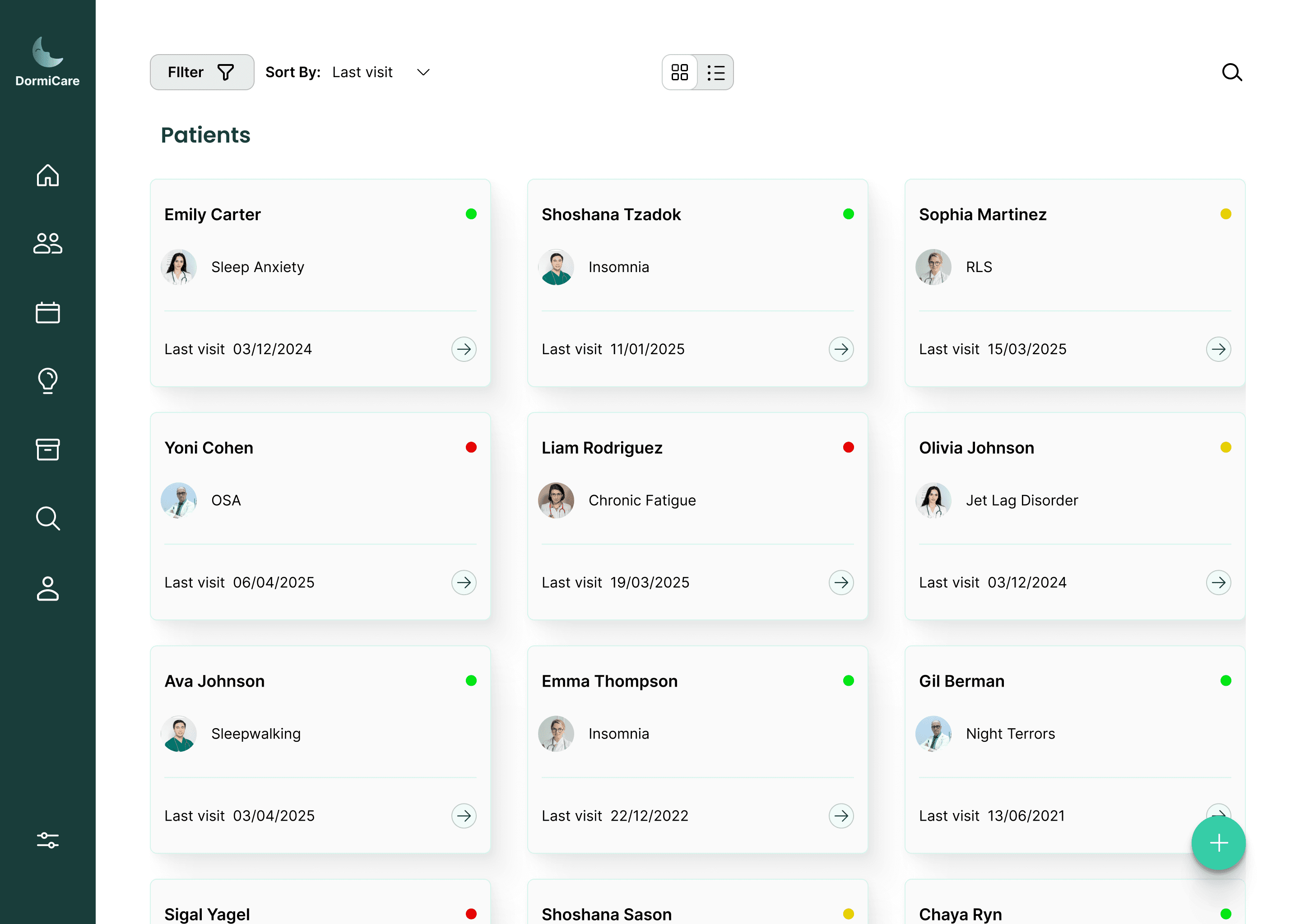
This screen displays all clinic patients in a structured list showing name, sleep disorder, treatment status, assigned doctor, and last visit date.
It helps staff quickly track progress, spot urgent cases, and manage treatments efficiently.
Patients Screen
Recognizing the complexity of the system and the different work styles among professionals, I designed the screen to support both grid and list views, allowing each specialist to choose the layout that best suits their preferences and workflow.
Patient Profile Overview
This screen provides a comprehensive overview of each patient, designed for the specialist’s convenience.
It is accessed directly from the main patients screen, which allows searching by patient name.
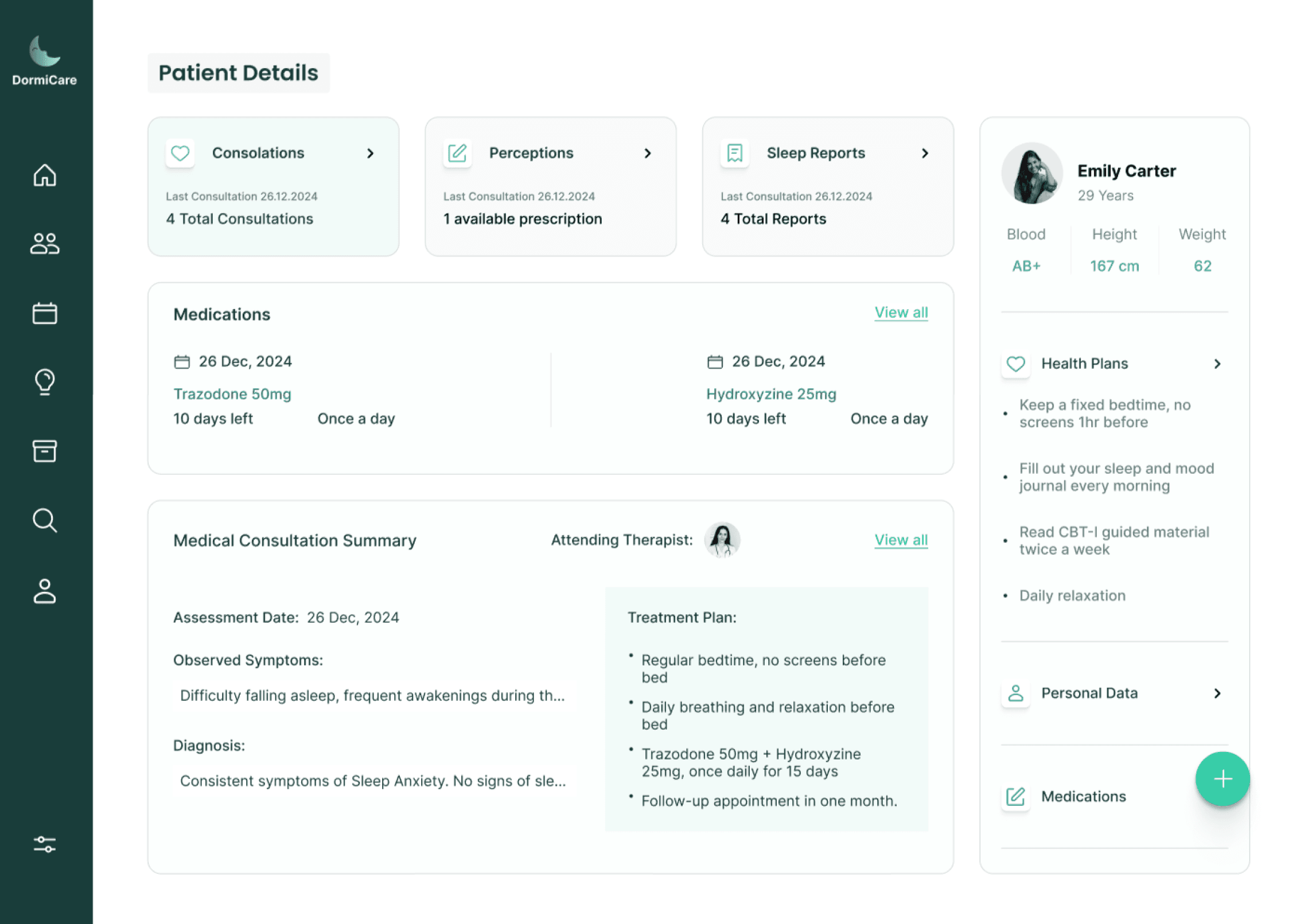
The goal is to present all relevant details and information about the patient in a clear and organized way, enabling the specialist to quickly and efficiently understand the overall condition.
The screen includes personal information, recommended treatment plans, medication and prescriptions, previous reports and consultations, and more.
All information is centralized in one place, eliminating the need to navigate between multiple pages, allowing the specialist to stay focused and deliver high-quality, professional care.
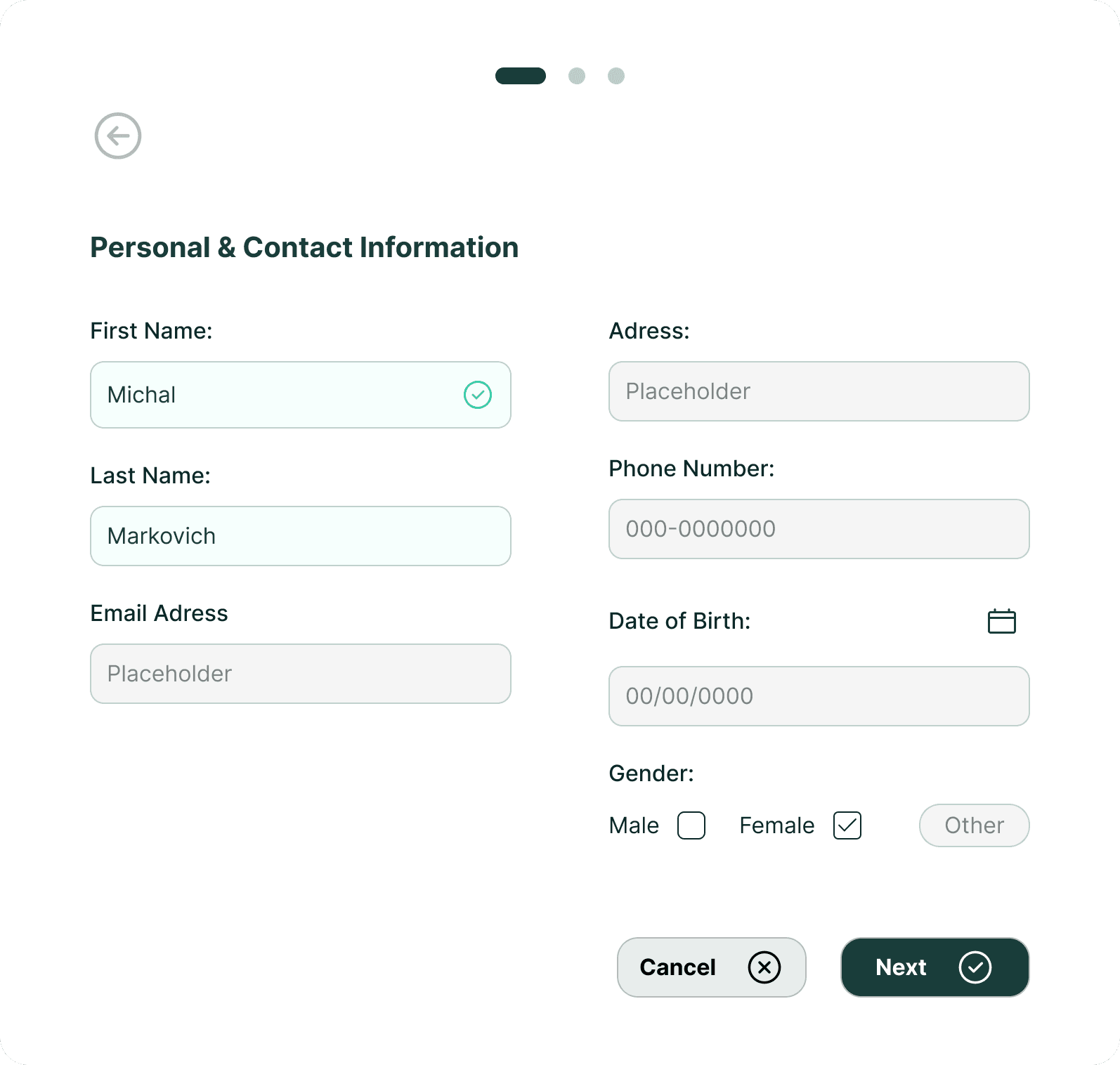
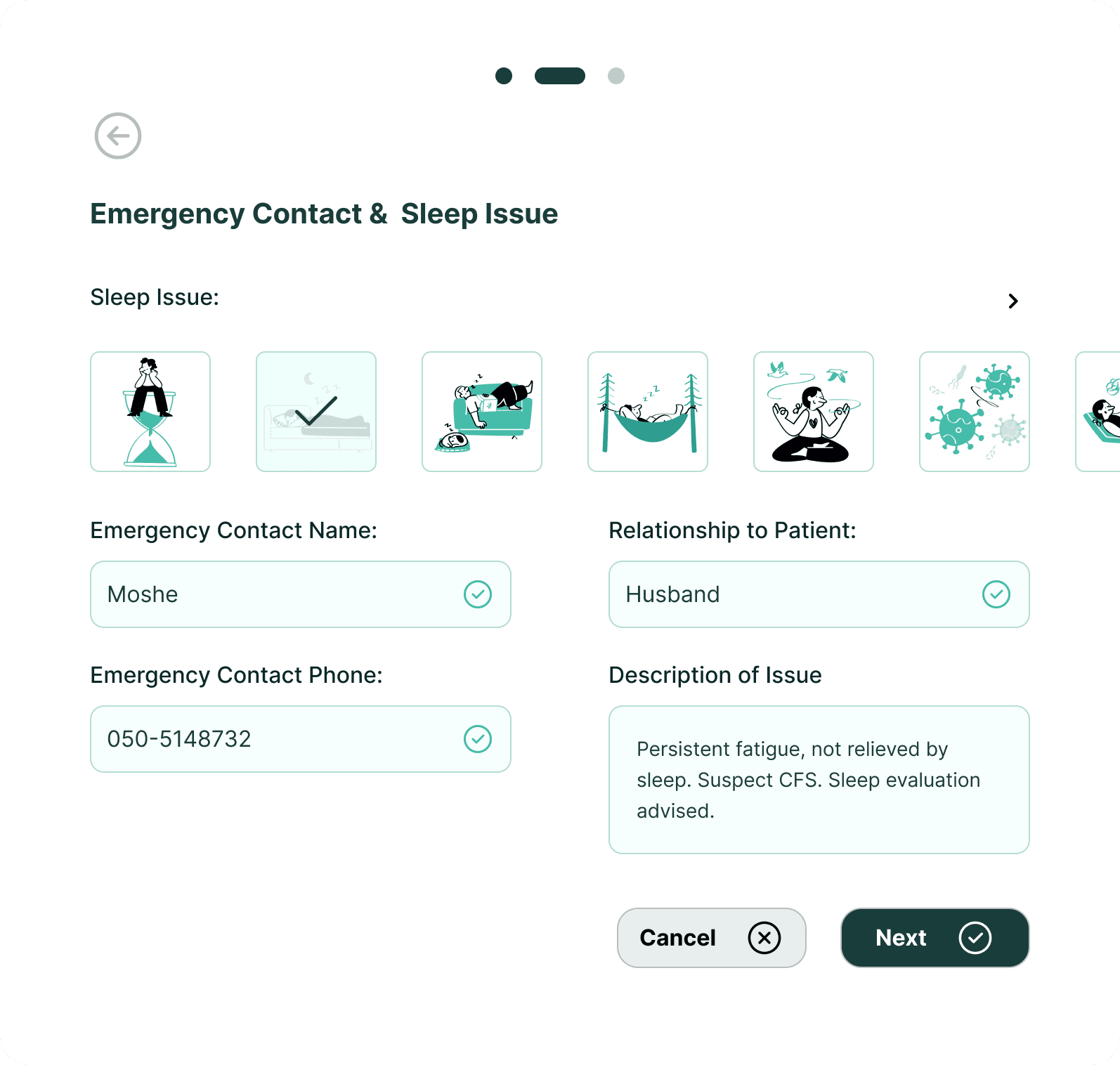
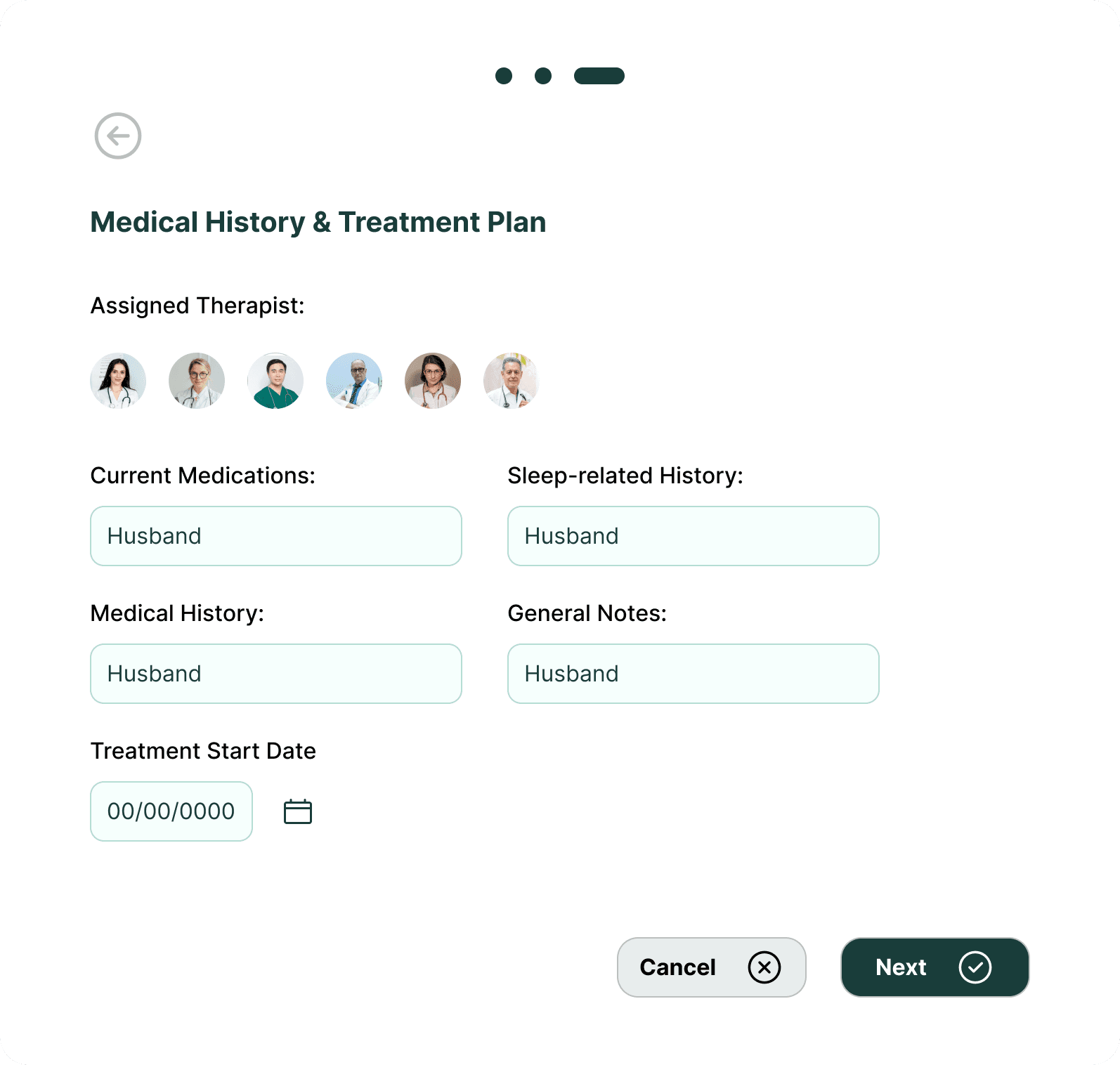
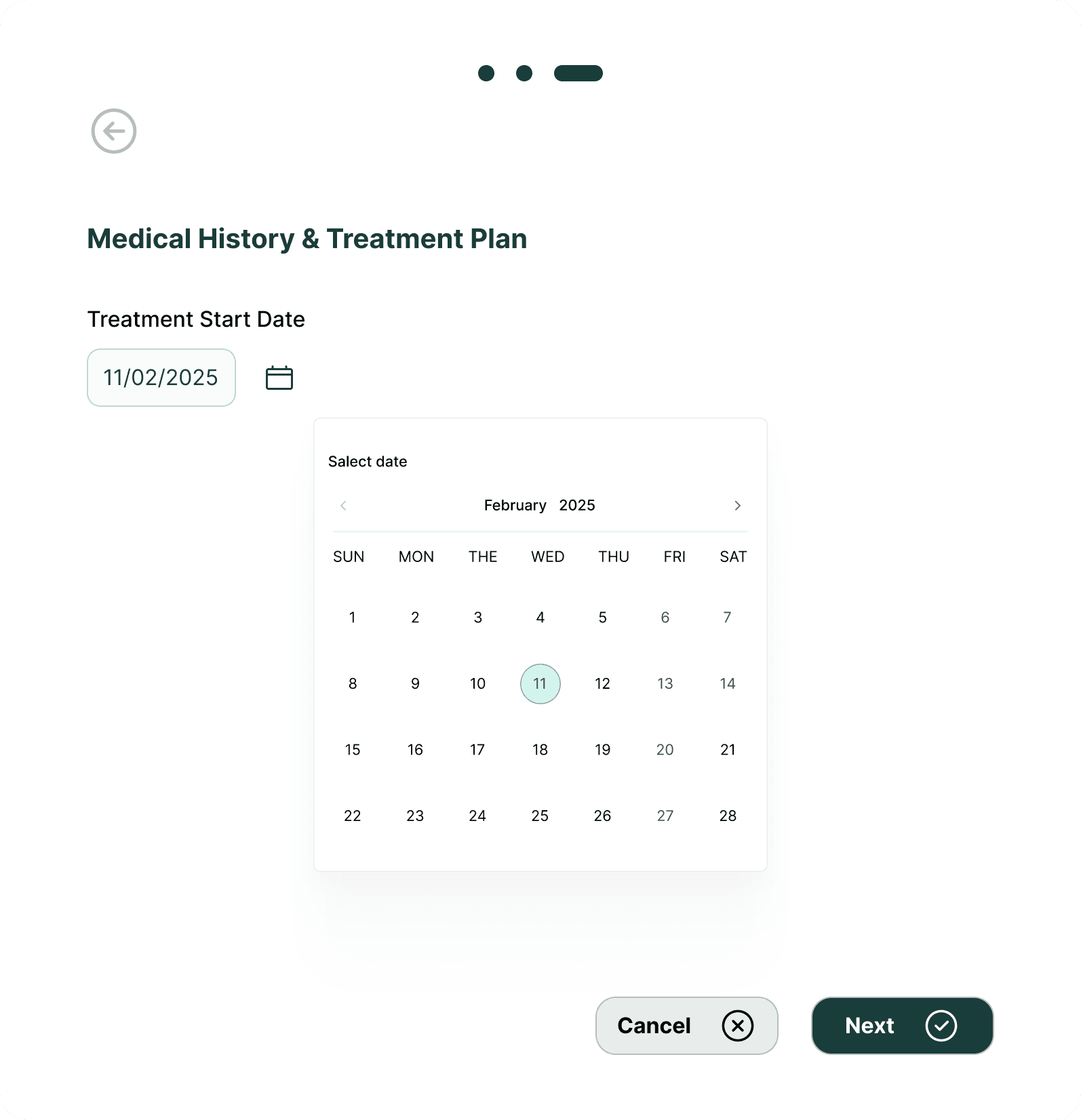
Adding a New Patient
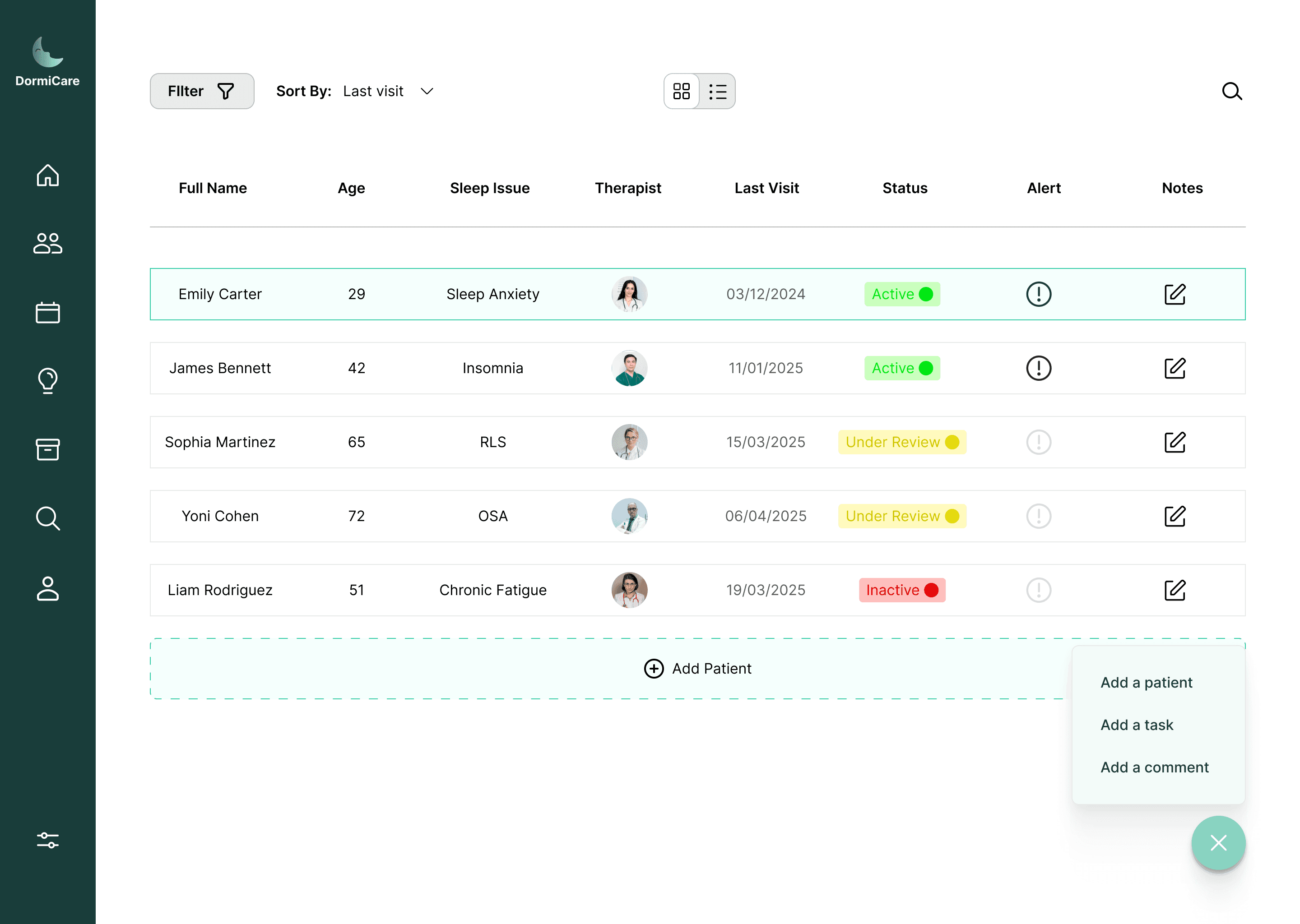
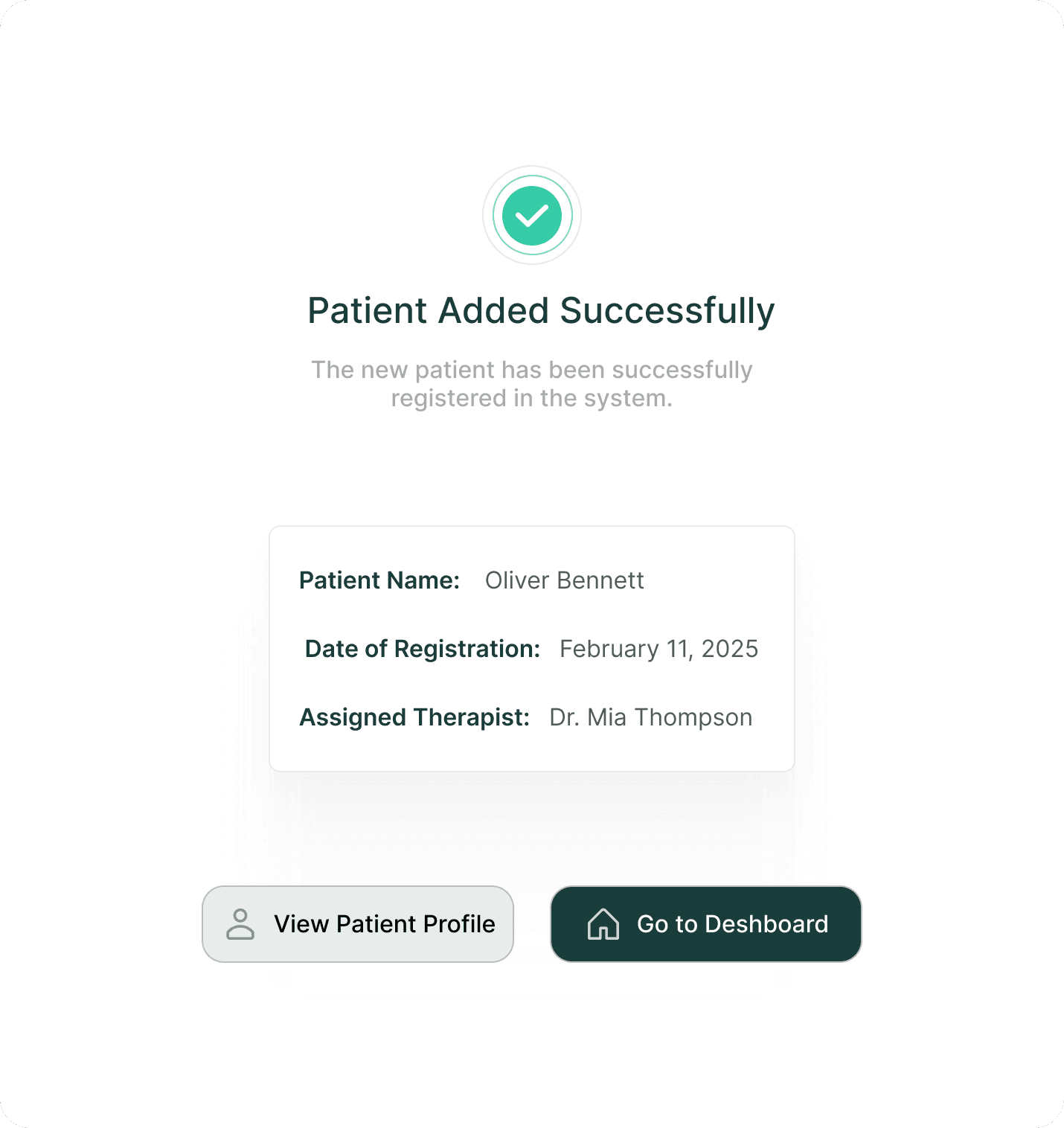
Since the system aims to help specialists manage patients and improve sleep and lifestyle, a key feature is the “Add New Patient” button, designed to remain visible and easily accessible across all main screens. Its central placement allows specialists to quickly add patients without disrupting workflow, supporting smooth intake and continuous care.
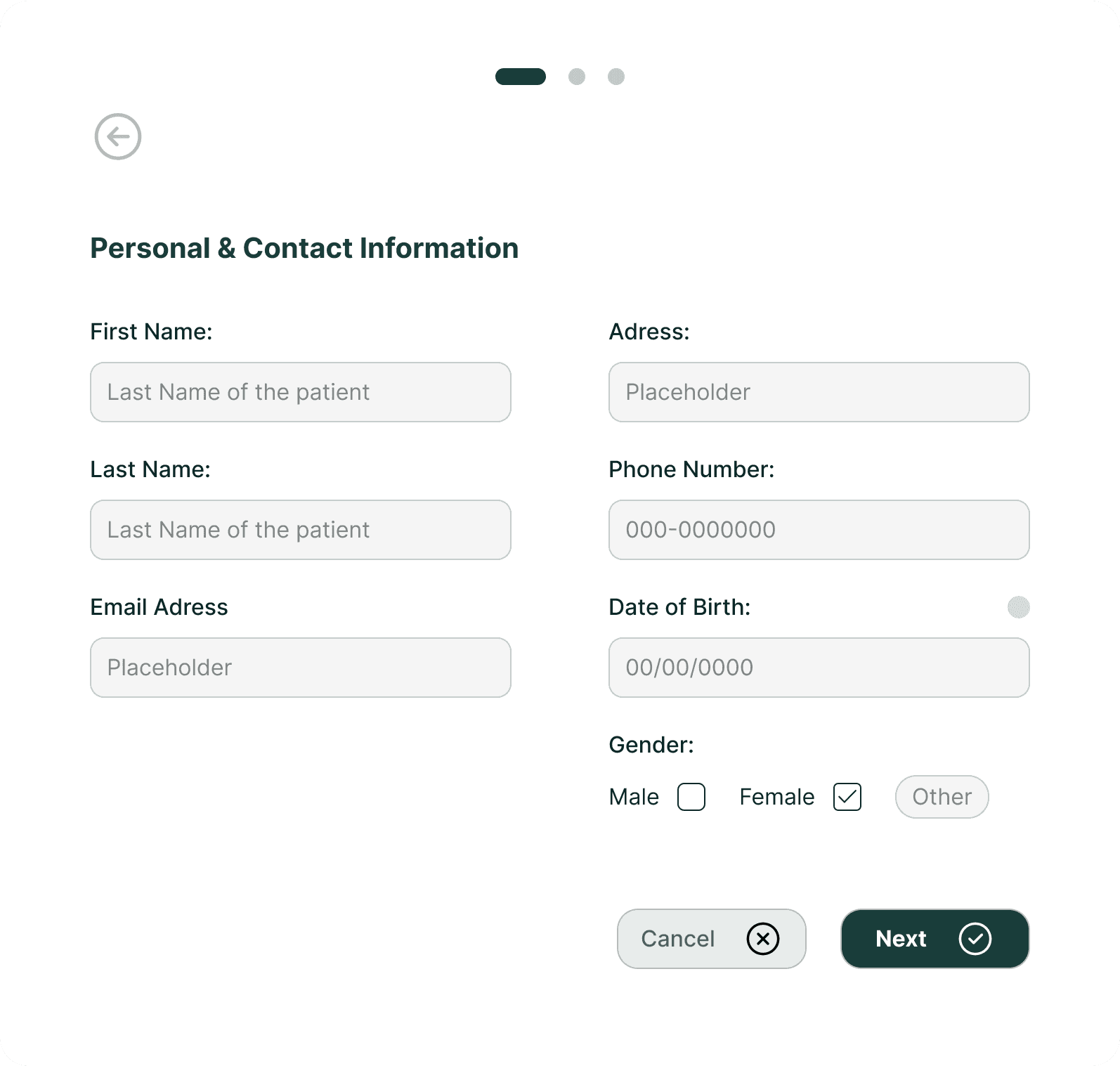
When
the specialist clicks on the feature, a flow unfolds where they register the new patient with all their personal details, including selecting the specialist assigned to the patient, choosing the type of sleep disorder, and more.
The value this screen brings to the system is making information accessible, structured, and intuitive, helping specialists in the diagnostic process and contributing to more accurate treatment for the patient.
Medical Knowledge Hub
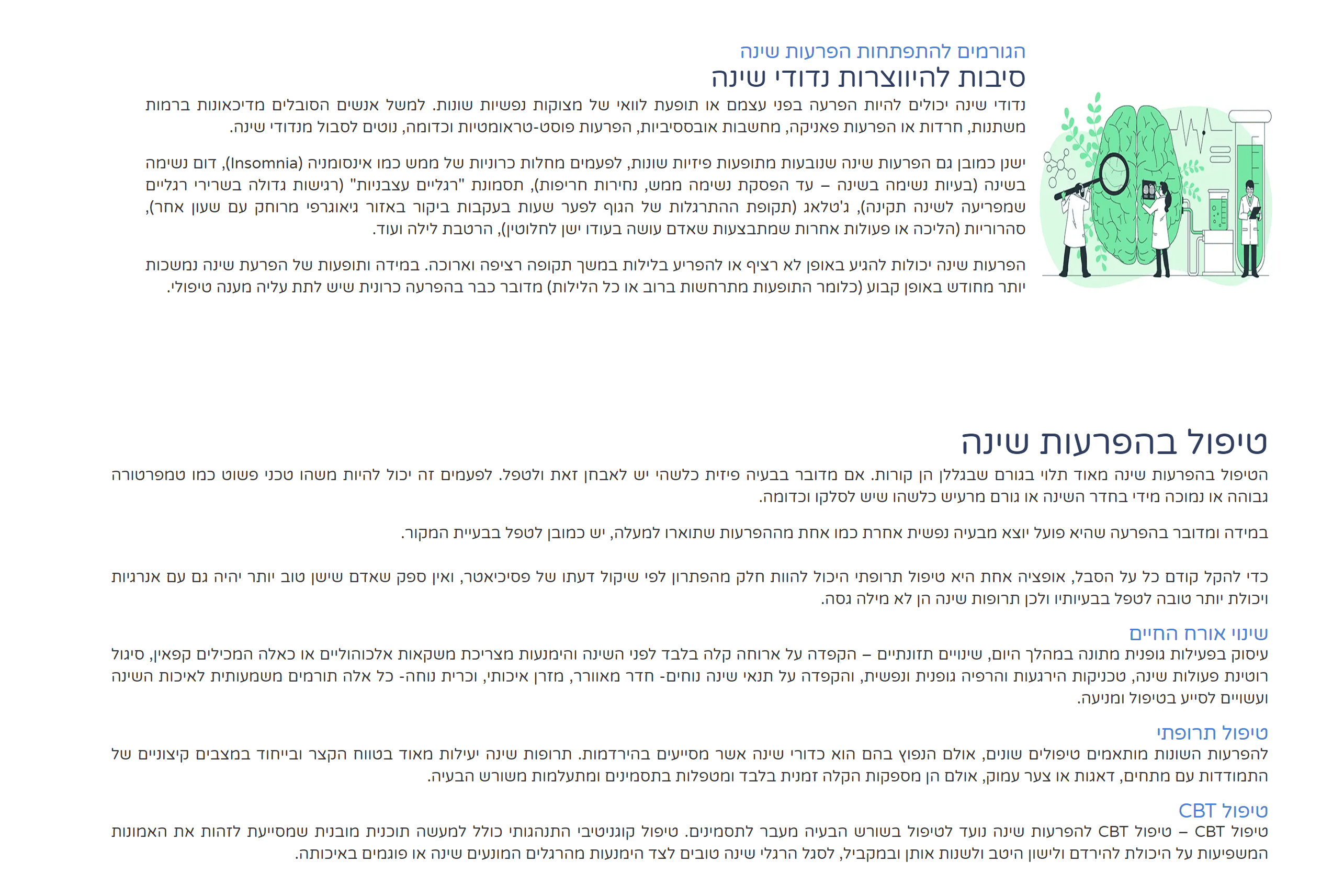
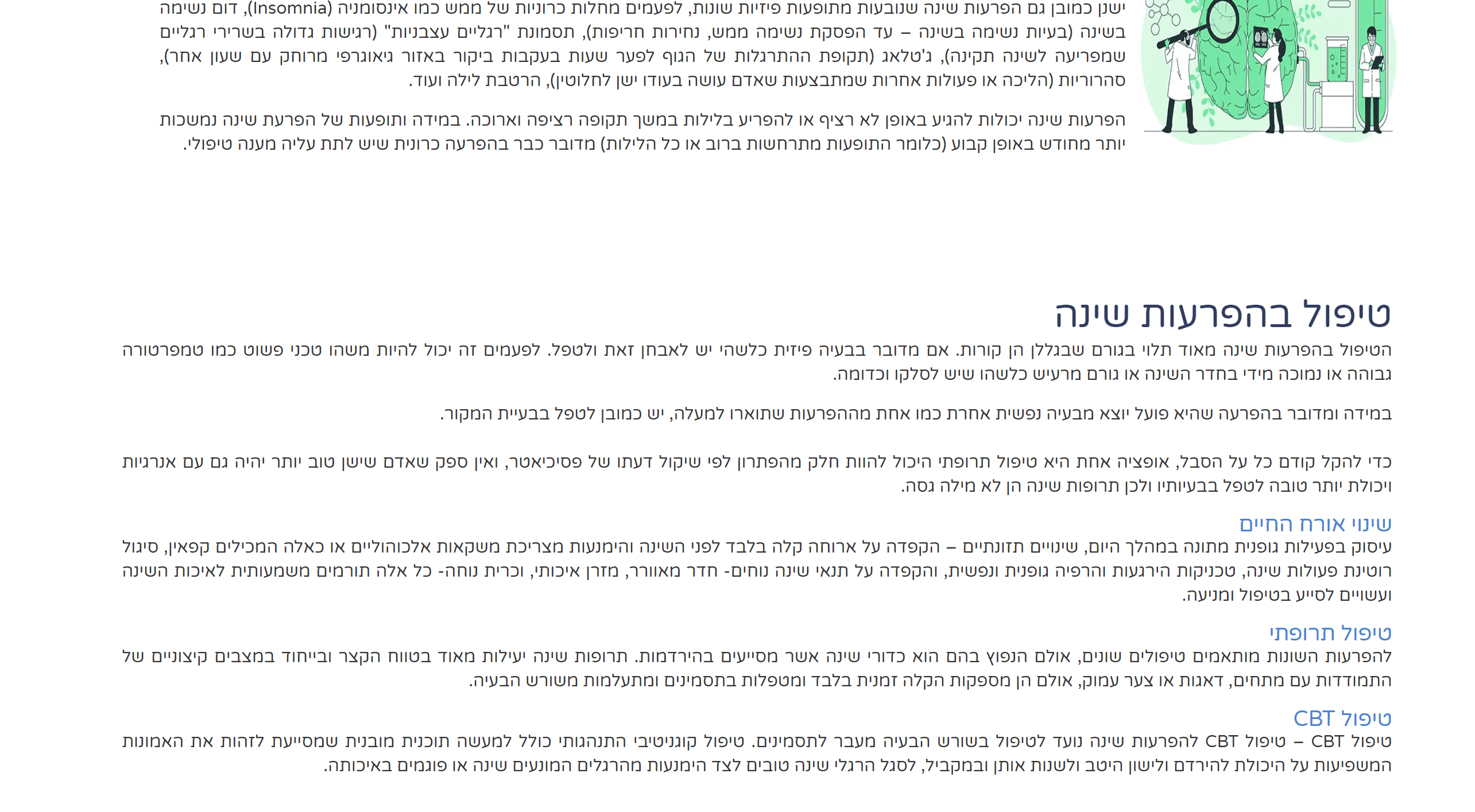
This screen provides therapists with concise, rich information, including articles, sleep disorder overviews, treatment methods, and practical tips. It gives quick access to essential knowledge, enhances expertise, and supports informed treatment decisions. The organized design keeps content clear, accessible, and intuitive.

The value this screen brings to the system is providing therapists with a smart tool to improve professional skills and support clinical decisions efficiently.
Sleep Disorders Screen
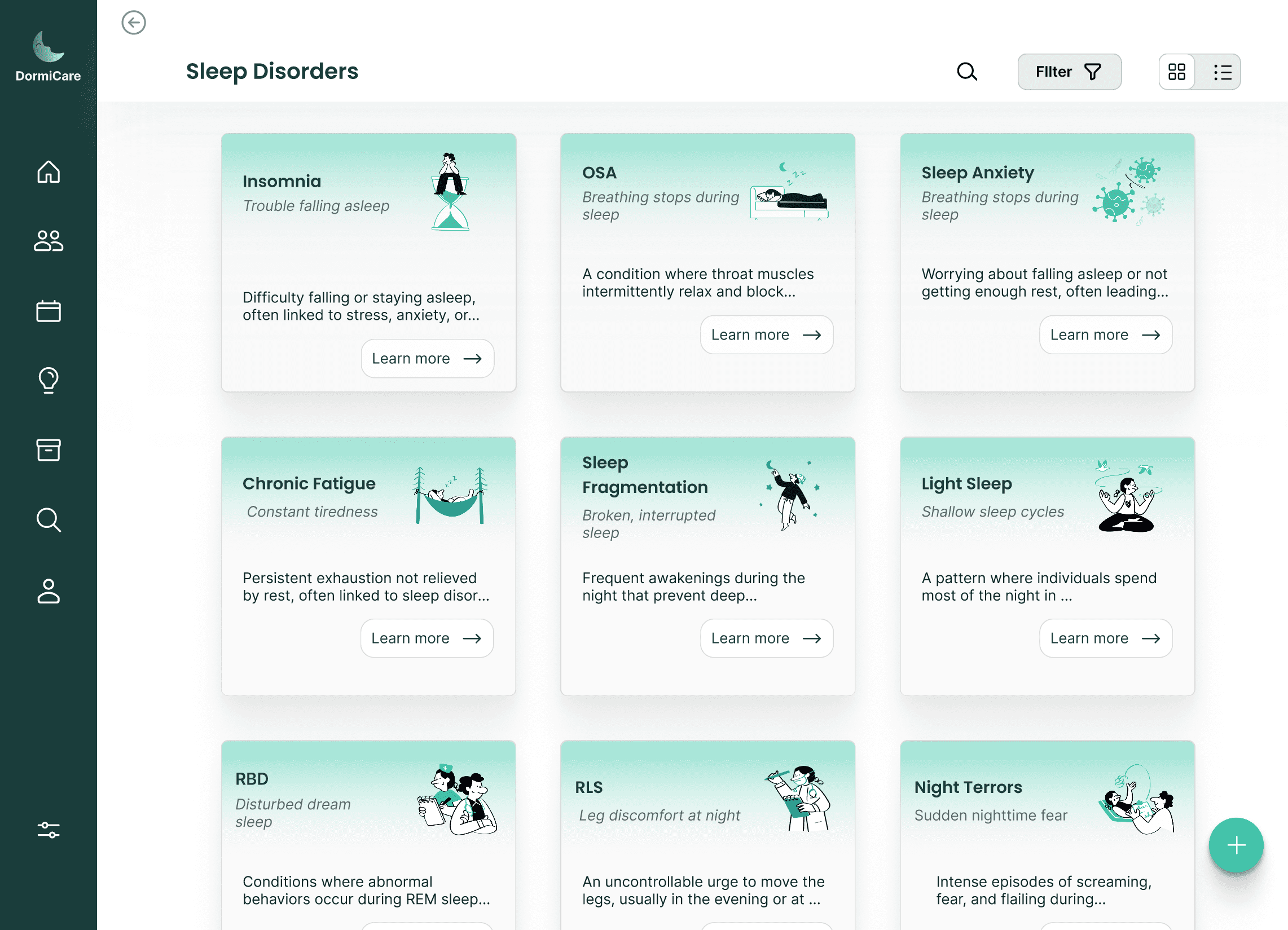
In this screen, users see an organized overview of common sleep disorders in clear tabs, with each tab providing a brief introduction and a link to a detailed page that includes a description, causes, treatment methods, and more.
Schedule Screen
This screen displays the therapist’s schedule clearly and intuitively, with options to filter and view it by month, week, or day. In addition, therapists can easily add tasks or events with detailed parameters, allowing them to enter all necessary information in an organized and precise manner. Each event can be assigned a color, enabling clear categorization.
The purpose of this screen is to help therapists manage their time efficiently, get a clear overview of upcoming tasks and events, and plan their daily work in a convenient and organized way.
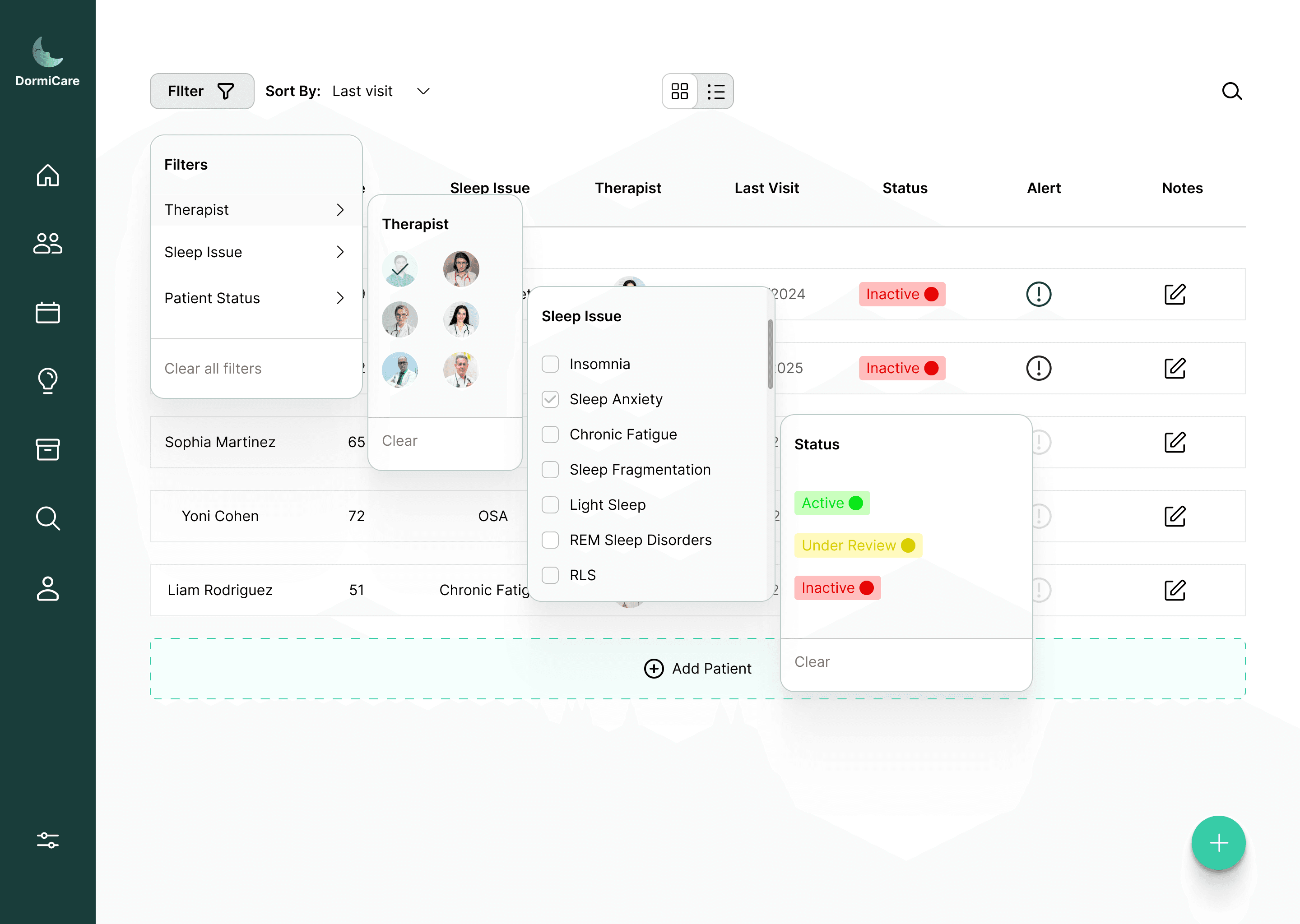
This screen displays patients and allows sleep specialists to filter the list by therapist, sleep disorder type, or treatment status. The clear, organized layout helps specialists focus on relevant patients quickly, enhancing efficiency and enabling smarter patient management.
Filtered Patient Dashboard
Persona
While planning the system, I considered two key personas: sleep specialists and patients.
To keep the design focused and personalized, I chose to center the system around the specialists.
By providing them with an intuitive, efficient tool, they can offer better, more tailored care- ultimately helping patients improve their sleep and overall well-being.
This is, in fact, the system’s primary goal- to provide specialists with an advanced and intuitive system that leads them to better outcomes for patients.
The primary users of DormiCare are sleep physicians, neurologists, and clinical psychologists working in sleep clinics and labs - professionals focused on structured patient management and clinical documentation without the need for real-time physiological monitoring.
Dr. Amir Levi
Sleep Specialist, Head of a Sleep Clinic
About the persona:
Additional Info: Dr. Levi sees patients with a wide range of complex sleep issues. He relies on clinical interviews and long-term follow-up rather than real-time sleep monitoring. His clinic handles dozens of cases weekly, and he's looking for a way to standardize documentation and streamline care.
Why DormiCare works for him:
The system helps Dr. Levi classify disorders, provide structured recommendations, and access clinical resources quickly - all in one place. He can monitor progress over time and easily manage patient referrals.Dr. Sara Stein
Clinical Psychologist specializing in CBT-i
About the persona:
Additional Info: Dr. Stein works with patients experiencing chronic insomnia and anxiety-related sleep disorders. She focuses on behavioral treatment approaches and collaborates regularly with sleep specialists and neurologists.
Why DormiCare works for her:
The platform allows her to view patients' sleep history and access clinical notes from referring specialists. She can add behavioral treatment plans, track outcomes, and communicate efficiently with the broader care team.Dr. Natalia Rain
Neurologist working part-time in a multidisciplinary sleep center
About the persona:
Additional Info: Dr. Rain evaluates patients whose sleep disturbances may have neurological causes. She typically becomes involved mid-process, after an initial assessment by a sleep specialist.
Why DormiCare works for her:
DormiCare provides her with immediate access to prior clinical evaluations, symptom descriptions, and treatment history. This allows her to contribute her expertise and document follow-up notes efficiently, without wasting time searching for information or re-assessing from scratch.
Wireframe
This stage represents the early planning of the user experience, focusing on layout, screen flow, and content structure, before moving on to user interface design decisions
At
this stage, I translated initial ideas and research insights into low-fidelity wireframes.
The goal was to define the product’s structure, user flow, and layout without distractions from visual design.
I
focused on organizing content, mapping out core functionalities, and ensuring a clear and intuitive user journey — all while keeping the needs of the chosen persona in mind.
This stage included:
Grouping and prioritizing content based on relevance and frequency of use
Creating functional UI components such as tabs, cards, input fields, and buttons
Testing and refining which features best support the specialist’s tasks
Designing logical screen transitions and user journeys
Maintaining consistency in layout and spacing to support future UI design
Laying the groundwork for accessibility and responsive adaptation
By focusing on structure before visuals, I ensured a user-centered, functional flow that would seamlessly translate into high-fidelity design.
As part of the design process, I created a series of preliminary wireframes before moving into the UI stage. The process began with initial hand-drawn sketches to map ideas and screen structures, continued with basic wireframes in Figma to define key screens, and culminated in advanced high-fidelity wireframes, including detailed elements, visual hierarchy, and emphasis levels that guided the final UI design.
Initial sketch - manual mapping and prototyping of the system structure, showing a sample information screen for caregivers
Hand-drawn sketch - design of the Sleep Issues screen in a grid layout
Initial sketch - mapping and prototyping of the Patients screen in a list view, early wireframe in Figma
Advanced wireframe - prototyping the Patients screen in a list view with detailed item display
Advanced wireframe - high-fidelity screen with all elements and final layout. Even without colors, the hierarchy and emphasis for the upcoming UI design are clearly visible
Highlights
This section showcases key screens from the product, highlighting the core features and the overall structure of the system.
Each screen was carefully designed to support sleep specialists in their daily workflow- from managing patient profiles and tracking medication, to documenting treatments and generating personalized recommendations.
Together, these screens reflect the system’s main goals- improving clinical efficiency and ultimately enhancing patients’ quality of life.
Home Screen
The home screen provides sleep specialists with a clear and detailed overview of their daily tasks and patient activity. It includes quick access to key sections such as patients under monitoring, alerts, a task diary for the day, the option to add a new patient, and a section of enriching information. This screen serves as the central hub of the system - designed to help professionals stay focused, organized, and efficient from the moment they log in.
Patients Screen
This screen displays all clinic patients in a structured list showing name, sleep disorder, treatment status, assigned doctor, and last visit date.
It helps staff quickly track progress, spot urgent cases, and manage treatments efficiently.
Recognizing the complexity of the system and the different work styles among professionals, I designed the screen to support both grid and list views, allowing each specialist to choose the layout that best suits their preferences and workflow.
Persona
While planning the system, I considered two key personas: sleep specialists and patients.
To keep the design focused and personalized, I chose to center the system around the specialists.
By providing them with an intuitive, efficient tool, they can offer better, more tailored care- ultimately helping patients improve their sleep and overall well-being.
This is, in fact, the system’s primary goal- to provide specialists with an advanced and intuitive system that leads them to better outcomes for patients.
The primary users of DormiCare are sleep physicians, neurologists, and clinical psychologists working in sleep clinics and labs — professionals focused on structured patient management and clinical documentation without the need for real-time physiological monitoring.
Name:
Dr. Amir Levi
Occupation:
Sleep Specialist, Head of a Sleep Clinic
About the persona :
Additional Info: Dr. Levi sees patients with a wide range of complex sleep issues. He relies on clinical interviews and long-term follow-up rather than real-time sleep monitoring. His clinic handles dozens of cases weekly, and he's looking for a way to standardize documentation and streamline care.
Why DormiCare works for him: The system helps Dr. Levi classify disorders, provide structured recommendations, and access clinical resources quickly — all in one place. He can monitor progress over time and easily manage patient referrals.
Name:
Dr. Sara Stein
Occupation:
Clinical Psychologist specializing in CBT-i
About the persona :
Additional Info: Dr. Stein works with patients experiencing chronic insomnia and anxiety-related sleep disorders. She focuses on behavioral treatment approaches and collaborates regularly with sleep specialists and neurologists.
Why DormiCare works for her: The platform allows her to view patients' sleep history and access clinical notes from referring specialists. She can add behavioral treatment plans, track outcomes, and communicate efficiently with the broader care team.
Name:
Dr. Natalia Rain
Occupation:
Neurologist working part-time in a multidisciplinary sleep center
About the persona :
Additional Info: Dr. Rain evaluates patients whose sleep disturbances may have neurological causes. She typically becomes involved mid-process, after an initial assessment by a sleep specialist.
Why DormiCare works for her: DormiCare provides her with immediate access to prior clinical evaluations, symptom descriptions, and treatment history. This allows her to contribute her expertise and document follow-up notes efficiently, without wasting time searching for information or re-assessing from scratch.
Wireframe
This stage represents the early planning of the user experience, focusing on layout, screen flow, and content structure, before moving on to user interface design decisions
At
this stage, I translated initial ideas and research insights into low-fidelity wireframes.
The goal was to define the product’s structure, user flow, and layout without distractions from visual design.
I
focused on organizing content, mapping out core functionalities, and ensuring a clear and intuitive user journey — all while keeping the needs of the chosen persona in mind.
This stage included:
Grouping and prioritizing content based on relevance and frequency of use
Creating functional UI components such as tabs, cards, input fields, and buttons
Testing and refining which features best support the specialist’s tasks
Designing logical screen transitions and user journeys
Maintaining consistency in layout and spacing to support future UI design
Laying the groundwork for accessibility and responsive adaptation
By focusing on structure before visuals, I ensured a user-centered, functional flow that would seamlessly translate into high-fidelity design.
As part of the design process, I created a series of preliminary wireframes before moving into the UI stage. The process began with initial hand-drawn sketches to map ideas and screen structures, continued with basic wireframes in Figma to define key screens, and culminated in advanced high-fidelity wireframes, including detailed elements, visual hierarchy, and emphasis levels that guided the final UI design.
Initial sketch - manual mapping and prototyping of the system structure, showing a sample information screen for caregivers
Hand-drawn sketch - design of the Sleep Issues screen in a grid layout
Initial sketch - mapping and prototyping of the Patients screen in a list view, early wireframe in Figma
Advanced wireframe - prototyping the Patients screen in a list view with detailed item display
Advanced wireframe - high-fidelity screen with all elements and final layout. Even without colors, the hierarchy and emphasis for the upcoming UI design are clearly visible
Highlights
This section showcases key screens from the product, highlighting the core features and the overall structure of the system.
Each screen was carefully designed to support sleep specialists in their daily workflow- from managing patient profiles and tracking medication, to documenting treatments and generating personalized recommendations.
Together, these screens reflect the system’s main goals- improving clinical efficiency and ultimately enhancing patients’ quality of life.
Home Screen
The home screen provides sleep specialists with a clear and detailed overview of their daily tasks and patient activity. It includes quick access to key sections such as patients under monitoring, alerts, a task diary for the day, the option to add a new patient, and a section of enriching information. This screen serves as the central hub of the system - designed to help professionals stay focused, organized, and efficient from the moment they log in.
Patients Screen
This screen displays all clinic patients in a structured list showing name, sleep disorder, treatment status, assigned doctor, and last visit date.
It helps staff quickly track progress, spot urgent cases, and manage treatments efficiently.
Recognizing the complexity of the system and the different work styles among professionals, I designed the screen to support both grid and list views, allowing each specialist to choose the layout that best suits their preferences and workflow.
Filtered Patient Dashboard
This screen displays patients and allows sleep specialists to filter the list by therapist, sleep disorder type, or treatment status. The clear, organized layout helps specialists focus on relevant patients quickly, enhancing efficiency and enabling smarter patient management.
This screen displays patients and allows sleep specialists to filter the list by therapist, sleep disorder type, or treatment status. The clear, organized layout helps specialists focus on relevant patients quickly, enhancing efficiency and enabling smarter patient management.
Patient Profile Overview
This screen provides a comprehensive overview of each patient, designed for the specialist’s convenience.
It is accessed directly from the main patients screen, which allows searching by patient name.
The goal is to present all relevant details and information about the patient in a clear and organized way, enabling the specialist to quickly and efficiently understand the overall condition.
The screen includes personal information, recommended treatment plans, medication and prescriptions, previous reports and consultations, and more.
All information is centralized in one place, eliminating the need to navigate between multiple pages, allowing the specialist to stay focused and deliver high-quality, professional care.
The goal is to present all relevant details and information about the patient in a clear and organized way, enabling the specialist to quickly and efficiently understand the overall condition.
The screen includes personal information, recommended treatment plans, medication and prescriptions, previous reports and consultations, and more.
All information is centralized in one place, eliminating the need to navigate between multiple pages, allowing the specialist to stay focused and deliver high-quality, professional care.
Adding a New Patient
Adding a New Patient
Since the system aims to help specialists manage patients and improve sleep and lifestyle, a key feature is the “Add New Patient” button, designed to remain visible and easily accessible across all main screens. Its central placement allows specialists to quickly add patients without disrupting workflow, supporting smooth intake and continuous care.
Since the system aims to help specialists manage patients and improve sleep and lifestyle, a key feature is the “Add New Patient” button, designed to remain visible and easily accessible across all main screens. Its central placement allows specialists to quickly add patients without disrupting workflow, supporting smooth intake and continuous care.
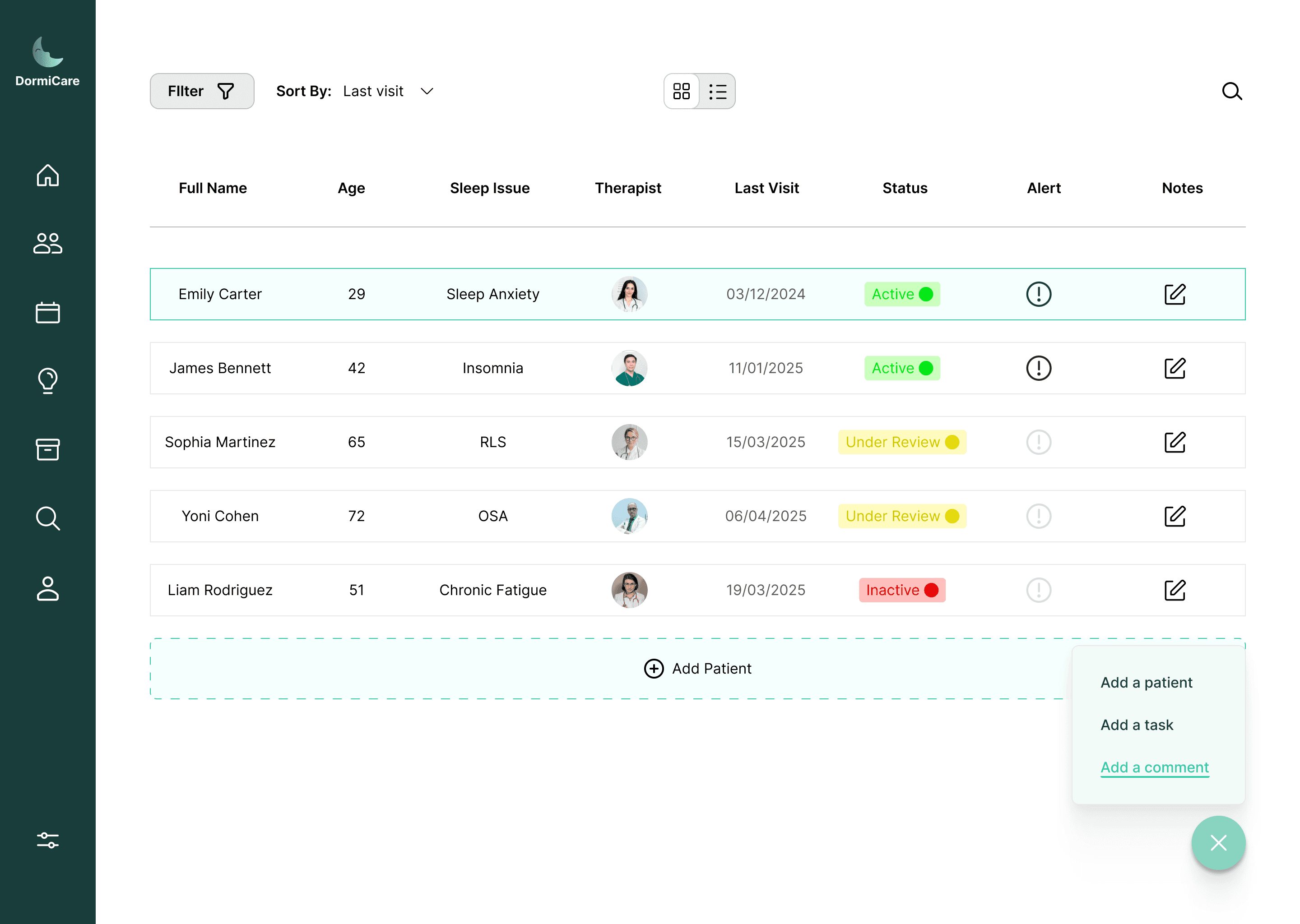
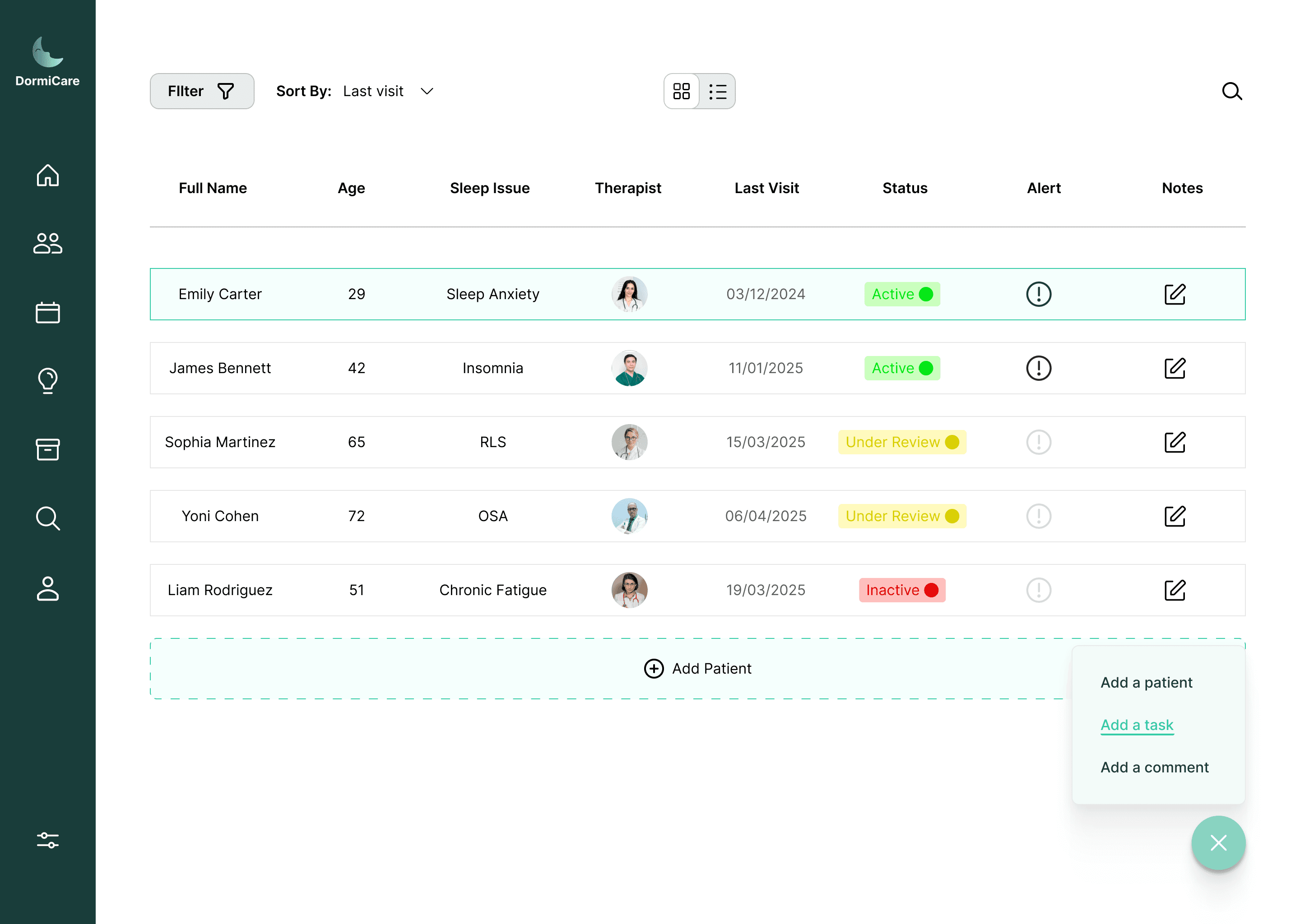
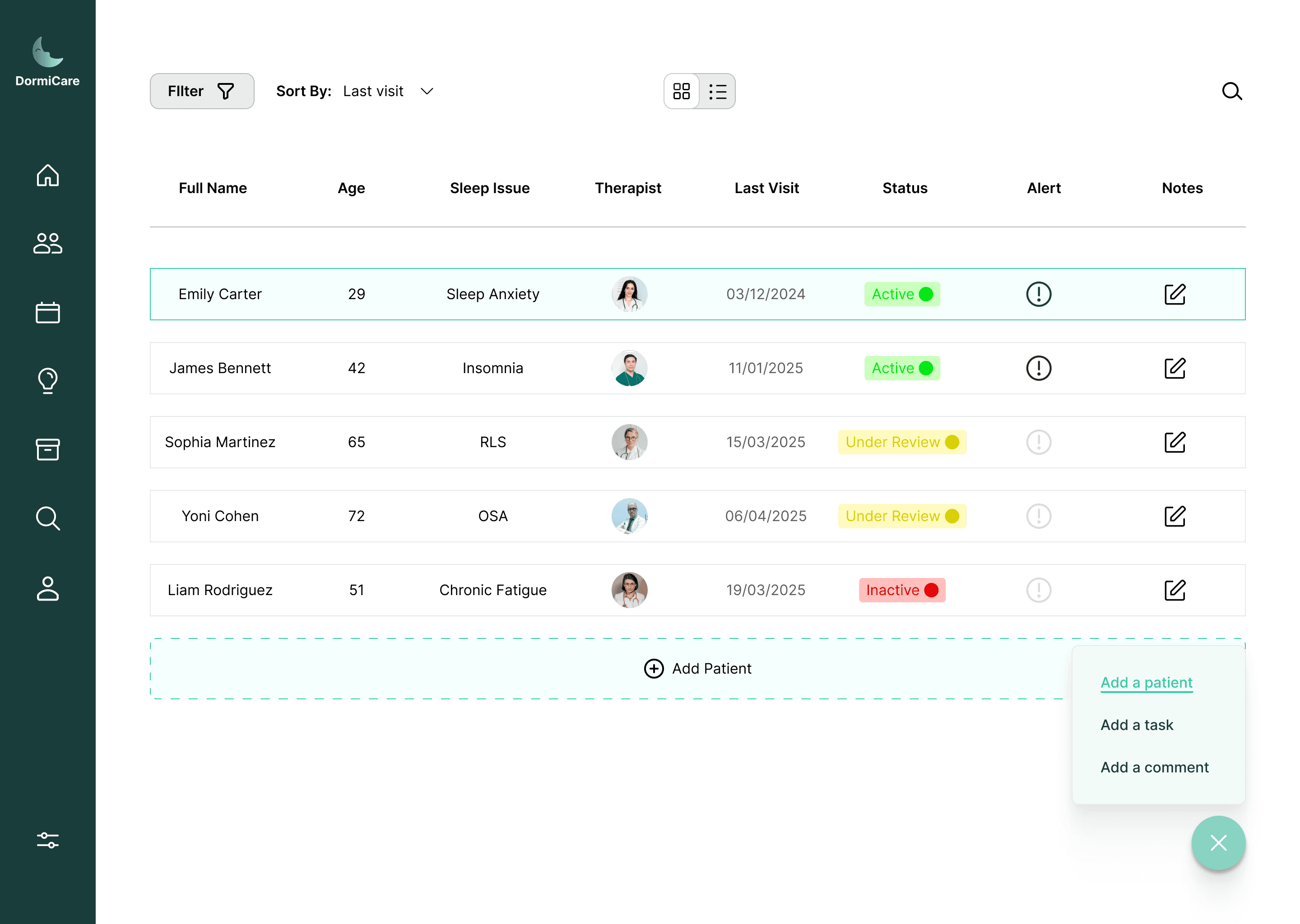
When
the specialist clicks on the feature, a flow unfolds where they register the new patient with all their personal details, including selecting the specialist assigned to the patient, choosing the type of sleep disorder, and more.
the specialist clicks on the feature, a flow unfolds where they register the new patient with all their personal details, including selecting the specialist assigned to the patient, choosing the type of sleep disorder, and more.
The value this screen brings to the system is making information accessible, structured, and intuitive, helping specialists in the diagnostic process and contributing to more accurate treatment for the patient.
The value this screen brings to the system is making information accessible, structured, and intuitive, helping specialists in the diagnostic process and contributing to more accurate treatment for the patient.
It gives quick access to essential knowledge, enhances expertise, and supports informed treatment decisions. The organized design keeps content clear, accessible, and intuitive.
Medical Knowledge Hub
This screen provides therapists with concise, rich information, including articles, sleep disorder overviews, treatment methods, and practical tips. It gives quick access to essential knowledge, enhances expertise, and supports informed treatment decisions. The organized design keeps content clear, accessible, and intuitive.
This screen provides therapists with concise, rich information, including articles, sleep disorder overviews, treatment methods, and practical tips.
The value this screen brings to the system is providing therapists with a smart tool to improve professional skills and support clinical decisions efficiently.
The value this screen brings to the system is providing therapists with a smart tool to improve professional skills and support clinical decisions efficiently.
Sleep Disorders Screen
In this screen, users see an organized overview of common sleep disorders in clear tabs, with each tab providing a brief introduction and a link to a detailed page that includes a description, causes, treatment methods, and more.
In this screen, users see an organized overview of common sleep disorders in clear tabs, with each tab providing a brief introduction and a link to a detailed page that includes a description, causes, treatment methods, and more.
Schedule Screen
This screen displays the therapist’s schedule clearly and intuitively, with options to filter and view it by month, week, or day. In addition, therapists can easily add tasks or events with detailed parameters, allowing them to enter all necessary information in an organized and precise manner. Each event can be assigned a color, enabling clear categorization.
This screen displays the therapist’s schedule clearly and intuitively, with options to filter and view it by month, week, or day. In addition, therapists can easily add tasks or events with detailed parameters, allowing them to enter all necessary information in an organized and precise manner. Each event can be assigned a color, enabling clear categorization.
The purpose of this screen is to help therapists manage their time efficiently, get a clear overview of upcoming tasks and events, and plan their daily work in a convenient and organized way.
The purpose of this screen is to help therapists manage their time efficiently, get a clear overview of upcoming tasks and events, and plan their daily work in a convenient and organized way.